

Your Guide to Crafting the Perfect AI Picture Prompt
Go beyond basic keywords. This guide teaches you how to write a detailed AI picture prompt that generates stunning, professional images every single time.
Table of Contents
An AI picture prompt isn't just a search query; it's a creative command. Think of it less like typing a few words into Google and more like giving a detailed brief to a skilled artist. The real trick is learning to write descriptive instructions that give you predictable, high-quality images every single time.
The Anatomy of an Effective AI Picture Prompt
Let's get past the "type-and-pray" method. A truly great AI prompt has a solid structure, almost like a well-written sentence. This structure is what helps the AI grasp not just what you want to see, but the entire mood, context, and tiny details that make an image pop.
Getting a handle on these building blocks is your first real step toward creative control. It’s the difference between a vague concept like "a business person" and a powerful, specific image. For instance, you could instead write: "A close-up portrait of a female entrepreneur with glasses, smiling confidently, in a modern sunlit office with blurred city views." See the difference? That level of detail leaves far less to chance and steers the AI exactly where you want it to go.
Core Components of a Strong Prompt
When you boil it down, every effective prompt I've ever written has three key ingredients that work together to paint a complete picture. You can think of them as the subject, the action, and the setting of your visual story.
- The Subject: This is your main event—the person, object, or creature at the center of your image. Specificity is your best friend here. Don't just say "a dog"; try "a fluffy Corgi puppy."
- The Action: What's your subject up to? This is what breathes life and a sense of narrative into the scene. The action can be something subtle, like "contemplating," or something dynamic, like "sprinting through a meadow."
- The Context: This is the world your subject lives in. The environment and background provide the atmosphere that grounds everything. Details like "in a neon-lit cyberpunk city at midnight" or "on a weathered farmhouse porch" are what make the scene believable.
This simple diagram shows how these three pieces—Subject, Action, and Context—fit together to form the backbone of any good prompt.
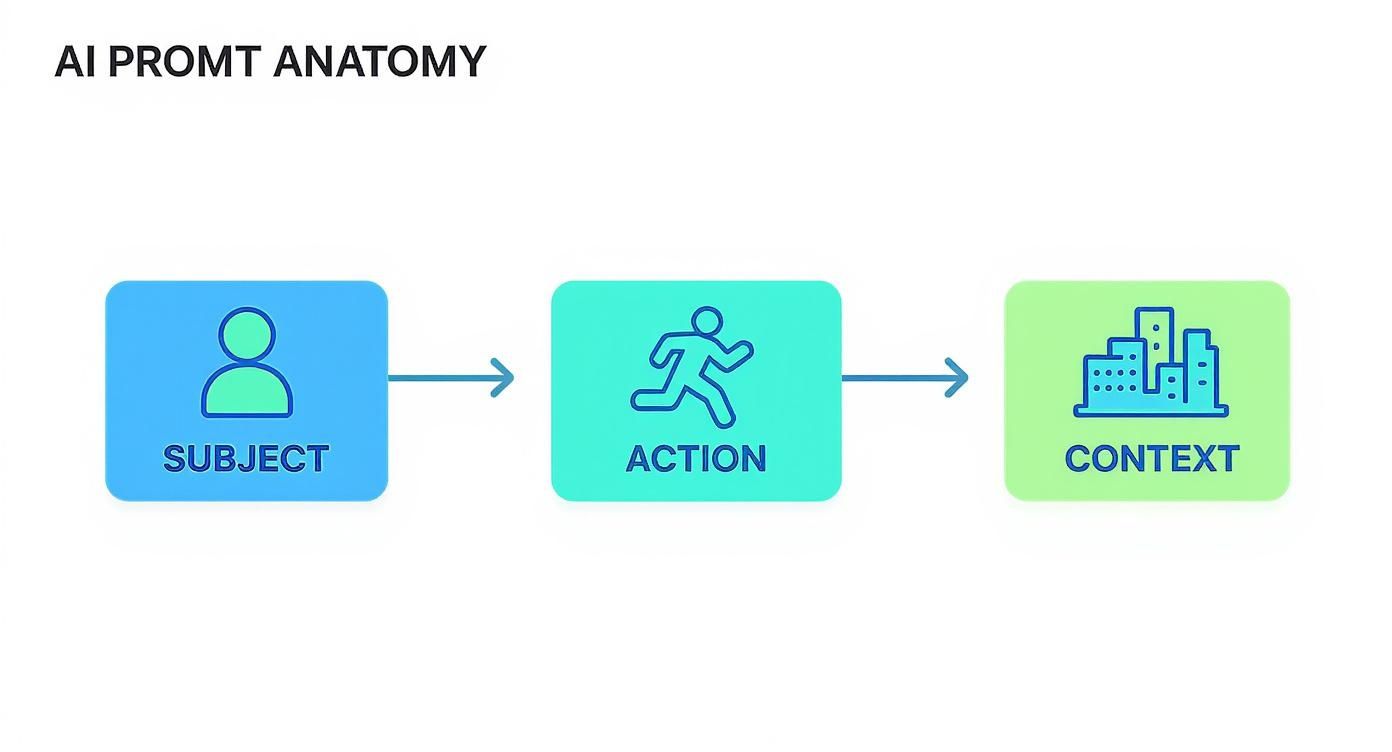
By weaving these elements together, you’re giving the AI a crystal-clear instruction that it can translate into a stunningly detailed image.
To help you visualize how these pieces come together, here's a quick breakdown of each component and its role.
AI Prompt Component Breakdown
This table dissects the essential elements of an effective AI picture prompt, showing the impact of each component on the final image.
| Component | Purpose | Example |
|---|---|---|
| Subject | Identifies the main focus of the image. The more specific, the better. | A wise old wizard with a long white beard |
| Action | Describes what the subject is doing, adding dynamism and story. | casting a glowing spell |
| Context | Sets the scene and establishes the mood, background, and environment. | in a candle-lit library filled with ancient books |
As you can see, combining these simple parts creates a much richer and more descriptive prompt than any single component could alone.
Why This Structure Matters
Nailing this basic anatomy makes you a more efficient and imaginative creator. The growth here has been mind-boggling; with over 34 million AI-generated images being created daily, you need some skill to make your work stand out. This isn't just a niche trend, either. AI-generated content now makes up over 68% of images used in many modern marketing campaigns, proving just how deeply this tech is being woven into the professional world.
A well-structured prompt is like giving a photographer a detailed shot list instead of a vague idea. The more specific your instructions, the closer the final result will be to what you imagined.
If you're looking to go deeper, exploring these 10 powerful AI image prompt types is a great next step to expand your creative toolkit. And for those curious about how this all connects back to traditional photography, check out our guide on the real-world impact of https://youraiphotographer.com/blog/ai-for-photography.
Directing Your Scene With Style and Lighting
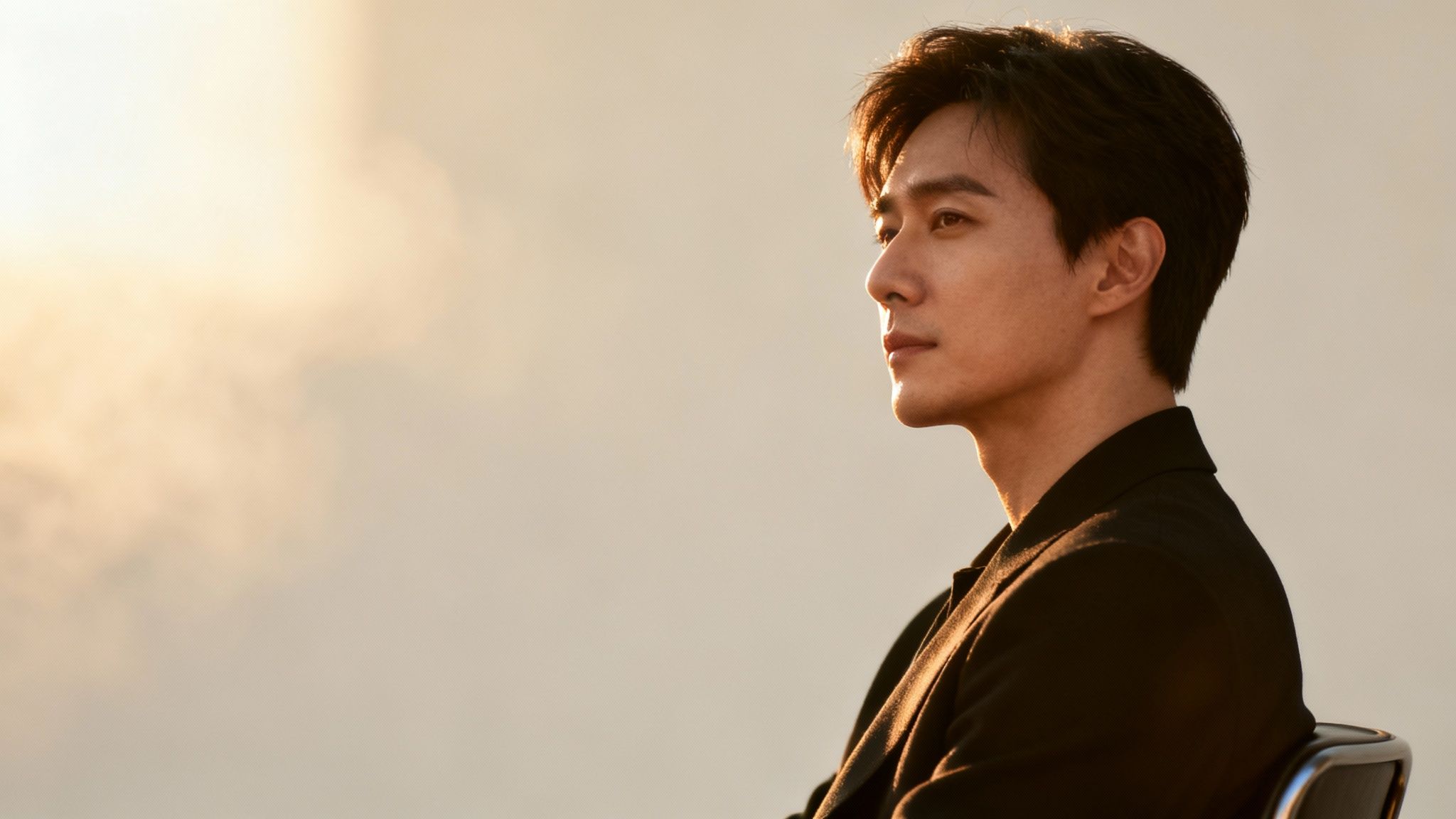
Once you have the subject and action nailed down, it's time to step into the director's chair. This is where crafting an ai picture prompt gets really fun. The mood, the vibe, the whole artistic feel of your image—it's all shaped by the style and lighting modifiers you choose.
Getting a handle on these commands is what separates a generic, obviously-AI image from something truly special. A single word can completely change the game, turning a simple idea into a stunning piece of visual art.
Defining the Overall Artistic Style
Think of the style as the creative genre for your image. It’s the overarching aesthetic that ties everything together. You can pull from historical art movements, modern digital trends, or anything in between. Picking the right style gives your image a deliberate and consistent look.
Here are a few powerful style keywords I use all the time:
- Cinematic: This one word gives your scene a movie-like quality. Expect dramatic lighting, rich color grading, and often a widescreen feel. It’s my go-to for creating images that feel like they have a story to tell.
- Minimalist: If you want to cut through the noise, this is your modifier. It focuses on clean lines, simple color palettes, and plenty of negative space. Perfect for sleek product shots or a sophisticated brand image.
- Vaporwave: This dunks your image in a retro-futuristic world of neon pinks and blues, glitchy effects, and a heavy dose of 80s or 90s nostalgia.
- Fantasy Art: This keyword channels the vibe of classic fantasy book covers and illustrations, complete with epic landscapes and a real sense of wonder.
Just adding one of these terms makes a world of difference. For example, "a knight in armor" is a decent start. But "a knight in armor, fantasy art style" gives the AI much clearer instructions and delivers a far more evocative result.
Commanding the Atmosphere With Light
Lighting is everything. It's the soul of any photograph, whether it's real or AI-generated. Light sets the mood, sculpts the subject, and creates a sense of depth. Fortunately, YourAIPhotographer understands specific lighting cues, giving you precise control over the atmosphere. Don't just describe the scene—light it.
Light is the language of photography. By mastering lighting commands in your AI picture prompt, you can tell a more compelling story, evoke specific emotions, and guide the viewer's eye exactly where you want it.
For instance, instead of asking for "a portrait of a CEO," you can dictate the exact mood. A great way to see how different modifiers work is to play around with some AI image generation demos; you'll quickly see how a small change in the prompt can create a completely different outcome.
Practical Lighting Modifiers to Try
Here are some of the lighting terms I find myself using again and again to get director-level control over a scene.
| Lighting Modifier | Effect on the Image | Best Used For |
|---|---|---|
| Dramatic Studio Lighting | Creates high contrast with deep shadows and bright highlights, really emphasizing form and texture. | Professional headshots, intense portraits, and high-end product photography. |
| Soft Golden Hour Glow | Bathes the scene in that warm, diffused light you see just after sunrise or before sunset. It's incredibly flattering. | Lifestyle photos, romantic scenes, and outdoor portraits. |
| Volumetric Haze | Adds visible beams of light cutting through mist, fog, or smoke. This instantly creates depth and atmosphere. | Moody landscapes, fantasy scenes, and cinematic interiors. |
| Rim Lighting | Outlines the subject with a bright light from behind, making them pop from the background with a cool halo effect. | Dynamic action shots and dramatic character portraits. |
Getting comfortable with these terms is a huge step up. In fact, if you're curious about the real-world techniques that inspire these AI commands, our guide on headshot lighting setups is a fantastic place to learn the principles behind the prompts.
Choosing Your Camera and Lens
Beyond style and lighting, you can get even more granular by specifying the virtual "camera" and "lens." This is another layer of control that mimics the choices a real photographer makes on a shoot, influencing everything from composition to perspective.
- Telephoto Lens: This modifier squashes the background, making distant things feel closer and creating that beautiful, blurry backdrop (also known as bokeh). It's perfect for professional portraits where you want the subject to be the undeniable focus.
- Wide-Angle Lens: Use this to capture a much broader view, making spaces feel huge and open. It's my choice for sweeping landscapes, architectural shots, or any scene with a lot going on.
- Macro Shot: This command tells the AI to get really close and focus on tiny details. Think of it as a virtual magnifying glass, revealing textures and patterns you'd normally miss. It’s great for product close-ups or nature shots.
When you start combining all these elements—style, lighting, and camera choice—your AI picture prompt becomes less of a request and more of a detailed blueprint. You're not just asking for a picture anymore; you're meticulously crafting it from the ground up.
How to Use Negative Prompts and Advanced Controls
Getting the hang of what to put in your prompt is only half the battle. The real trick to getting consistently clean, professional-looking images is learning how to tell the AI what you don’t want.
That's where negative prompts come in. They act as your personal quality control filter.
Think of it like giving your photographer a "don't-do" list before a shoot. By telling the AI to avoid common problems, you stop them from ever showing up in the first place. This one step can save you so much time and frustration.
Refining Your Vision with Negative Prompts
Negative prompts are your first line of defense against the weird stuff AI can sometimes generate. We've all seen it: those uncanny valley hands with six fingers, gibberish text on a sign, or a random watermark that just appears out of nowhere.
Instead of just crossing your fingers and hoping for the best, you can tell the AI to steer clear of these issues from the start. A good negative prompt is like a bouncer for your image, keeping all the unwanted elements out and leaving you with a much more polished and believable result.
Using negative prompts is like proofreading your image before it's even created. It’s the proactive step that removes the most common AI errors, instantly elevating the quality and professionalism of your output.
Here are a few of my go-to negative prompts that can immediately clean things up. I have these saved and use them as a starting point for almost everything.
- For Cleaner Subjects:
extra limbs, extra fingers, mutated hands, poorly drawn hands, disfigured, deformed, blurry, bad anatomy - For Better Quality:
ugly, duplicate, morbid, mutilated, out of frame, extra fingers, mutated hands, poorly drawn hands, poorly drawn face, mutation, deformed, ugly, blurry, bad anatomy, bad proportions, extra limbs, cloned face, disfigured, out of frame, ugly, extra limbs, gross proportions, malformed limbs, missing arms, missing legs, extra arms, extra legs, fused fingers, too many fingers, long neck, username, watermark, signature - For Clearer Backgrounds:
text, watermark, signature, jpeg artifacts, low resolution, blurry, grainy, noisy
Just drop these into the negative prompt field in YourAIPhotographer, and you'll see a noticeable difference right away.
Taking Full Control with Advanced Parameters
Once you're comfortable with negative prompts, you can start really fine-tuning your images with advanced controls. These are simple commands you add to the end of your prompt that give you director-level control over the image’s core properties.
These parameters aren't so much about the what in the image, but the how—the shape, the style, and even the level of creative chaos the AI is allowed. If you're trying to create something specific, like a YouTube thumbnail or a LinkedIn banner, knowing these controls is non-negotiable.
Calibrating Your Image Composition
The most common and immediately useful parameter is the aspect ratio. It sets the shape of your final image, making sure it’s a perfect fit for whatever platform you’re using it on.
--ar 16:9: Creates a widescreen image. Perfect for YouTube thumbnails, blog banners, and anything with a horizontal, cinematic feel.--ar 1:1: Generates a perfect square. This is the standard for Instagram posts and a lot of profile pictures.--ar 2:3: Gives you a vertical portrait orientation. Think Pinterest pins, Instagram stories, or professional headshots.
Adjusting Style and Creativity
Beyond just the shape, you can also manage the artistic intensity of your image. These next parameters let you dial in exactly how much the AI should stick to your instructions versus how much creative freedom it can take.
| Parameter | What It Controls | Practical Use Case |
|---|---|---|
Style (--s) |
A value from 0 to 1000 that adjusts how strongly the AI's default aesthetic is applied. Lower values stick closer to your prompt; higher values add more artistic flair. | For a photorealistic headshot, I'd use a lower --s value to keep it grounded. For a fantasy art piece, a higher value can create a much more stylized, epic look. |
Chaos (--c) |
This parameter (0-100) controls how varied and unexpected your results are. A value of 0 gives you reliable, similar images, while a higher value introduces more randomness. | If you're creating a consistent set of brand images, keep chaos low. If you're just brainstorming concepts, crank it up to see what kind of wild ideas the AI comes up with. |
When you start mastering these settings, you stop being a prompter and start becoming an AI art director. For anyone curious about the tech behind how AI models interpret these instructions, our guide on how to train an AI model takes a much deeper dive. You’re no longer just asking for a picture; you're meticulously building it, one parameter at a time.
Alright, let's get these AI prompts sounding like they came from a seasoned pro, not a machine. Theory is one thing, but having battle-tested starting points makes all the difference when you need great images, fast.
Here are a bunch of ready-to-use AI picture prompt templates I've put together for real-world situations. Think of them as your cheat sheet. Use them as they are, or even better, tweak the details in brackets to fit exactly what you're trying to create.
Prompts for E-Commerce and Product Shots
For any online store, great images aren't just a bonus—they're a necessity. Good product photos build trust and can seriously boost your sales. These prompts will help you generate clean, eye-catching visuals that make your products look irresistible.
1. The Classic Studio Product Shot
This is your go-to for crisp, distraction-free images that belong on a product page. It puts all the attention right where it needs to be: on your item.
Prompt:
High-resolution studio photograph of a [luxury leather handbag] on a seamless, solid [light gray] background. The lighting is soft and even, highlighting the [fine grain texture of the leather] and [polished metal hardware]. The product is angled slightly to show its depth and shape. --ar 1:1Customization Tip: Just swap out the bracketed text with your product’s details, background color, and the specific features you want the AI to focus on.
2. The Dynamic Lifestyle Scene
This one is all about context. Helping customers imagine your product in their own lives is a powerful sales tactic. You're not just selling a thing; you're selling an experience.
- Prompt:
A vibrant, natural lifestyle photo of a [young woman] smiling as she uses a [sleek, silver laptop] at a sun-drenched cafe table. A [cup of latte art coffee] sits beside the laptop. The background shows a softly blurred, bustling street scene. Photorealistic, golden hour lighting. --ar 16:9
Templates for Professional Headshots and Branding
Your professional image is your personal brand, whether it's on LinkedIn, your company's "About Us" page, or a conference speaker bio. These prompts will help you create polished, confident headshots that make you look like you mean business.
A great headshot isn't just a picture; it's a strategic tool. It communicates professionalism, confidence, and approachability before you've even said a word. Using AI to generate these can give you a dozen options in the time it takes to book one photoshoot.
1. The Modern Corporate Headshot
Perfect for LinkedIn or a company directory, this prompt generates a look that's clean, professional, and approachable. If you want to take this a step further, check out our guide on how to create an AI avatar from your photo.
- Prompt:
Corporate headshot of a [male entrepreneur in his 40s] with a friendly yet confident expression. He is wearing a [navy blue blazer and a crisp white shirt]. The background is a modern, out-of-focus office with large windows and natural light. Shot with a telephoto lens, shallow depth of field. --ar 2:3
2. The Creative Professional Portrait
If you work in a creative field, a standard corporate shot might feel a bit stiff. This prompt is designed to give you something with more personality and an artistic flair.
- Prompt:
Candid portrait of a [female graphic designer] in her creative studio, looking thoughtfully off-camera. She is surrounded by [mood boards and art supplies] in soft focus. The lighting is bright and airy, creating a warm, inviting atmosphere. Shot with a 50mm lens, natural style. --ar 4:5
To help you get started faster, here's a quick reference table outlining the core components for different types of prompts.
Prompt Templates for Different Use Cases
| Use Case | Key Prompt Elements | Example Modifier |
|---|---|---|
| Corporate Headshot | Subject, Attire, Setting, Lighting | shallow depth of field |
| Product Shot | Product, Background, Key Details, Lighting | soft and even lighting |
| Dating Profile | Subject, Activity, Vibe, Environment | golden hour |
| Lifestyle Image | Subject, Product in Use, Scene, Mood | candid moment |
This table should give you a solid foundation. Just pick your use case, fill in the key elements, and toss in a modifier to really dial in the final look.
Prompts for Standout Dating Profile Pictures
Let's be real: on a dating app, your photo is everything. A boring selfie isn't going to get you very far. These prompts are crafted to create engaging, authentic-looking pictures that show off your personality and make people want to swipe right.
The visual-first nature of these apps makes AI an incredibly useful tool. It's no surprise that AI-generated images are becoming a major part of our online lives. Some reports show that approximately 71% of images on social media are now generated by AI, which is completely changing how we present ourselves online.
1. The Adventurous Outdoor Shot
This prompt is great for showing you're active and have a passion for life—a very attractive quality. It instantly tells a story.
- Prompt:
Action shot of a [fit man in his early 30s] smiling, hiking on a scenic mountain trail during golden hour. He is wearing [practical hiking gear] and looks genuinely happy and energetic. The background is a breathtaking view of [sunlit peaks]. Photorealistic, candid moment. --ar 2:3
2. The Cozy and Approachable Indoor Portrait
Sometimes, a warm and inviting vibe is exactly what you need. This prompt creates an image that says you're down-to-earth, relaxed, and easy to talk to.
- Prompt:
A cozy, natural light portrait of a [woman in her late 20s] laughing while sitting in a comfortable armchair in a well-lit living room. She is holding a [cup of tea] and wearing a [cozy knit sweater]. The scene feels warm, authentic, and inviting. --ar 2:3
Getting Your Prompts Back on Track
So, you’ve crafted what feels like the perfect AI picture prompt, but the results are... not quite right. Maybe the AI ignored a key detail, or the image just looks flat and uninspired. It’s frustrating, but don’t worry—this is a normal part of the process. In fact, these moments are where you really start to learn.
Think of it less like giving a command and more like having a conversation. If the AI misunderstood you, the fix is usually to rephrase your request, adding a little more clarity or emphasis. A few smart adjustments can turn a head-scratching result into exactly what you envisioned.
When the AI Seems to Ignore You
One of the most common frustrations is when the AI flat-out ignores a core part of your prompt. You asked for red hair, you got blonde. You wanted a cat, it gave you a dog. This usually happens for one of two reasons: your prompt is overly complex, or one keyword is accidentally overpowering another.
The easiest fix is to simplify your prompt and tell the AI what’s most important. This is where weighted terms come in handy. By wrapping a word or phrase in extra parentheses, you’re basically telling the AI to pay closer attention to that specific detail.
- Original Prompt:
A woman with bright red hair standing in a forest. - Revised Prompt:
A woman with ((bright red hair)) standing in a forest.
That simple tweak dramatically increases the odds of getting the hair color you want. It's a direct way of saying, "Hey, this part is non-negotiable!"
From Blah to Breathtaking
What about when the image is technically correct but just… boring? It’s a common problem. The AI gives you a picture that looks like a generic stock photo, completely lacking any sort of vibe or energy. This is a tell-tale sign that your prompt was too basic.
Here’s your chance to play art director. Go beyond just describing the what and start describing the how. Add modifiers for lighting, mood, camera angles, and artistic style to really bring your idea to life.
My Go-To Tip: Don't underestimate how much a single well-chosen word can change everything. Tossing in a term like "cinematic," "dramatic lighting," or "candid moment" can instantly elevate a dull image into something truly special.
If you're running into more complex issues, our comprehensive troubleshooting guide has a ton of advanced strategies to explore.
Perfecting an Almost-Perfect Image
Ever get an image that's so close? The composition is spot-on, but one tiny detail is off. You don't have to start over. Instead, you can use the image’s "seed" number to iterate on it.
A seed is just a unique ID for that specific image generation. By plugging that same seed back in, you can tweak your prompt while keeping the overall layout and feel consistent. It’s the perfect way to fine-tune details without losing the parts of the image you already love.
Knowing how to troubleshoot is becoming a key skill. Back in early 2025, when OpenAI integrated image generation into ChatGPT, it went viral. Suddenly, everyone was creating everything from logos to fine art, highlighting just how important it is to move beyond basic commands and learn how to really refine the creative process. You can read more about the evolution of AI image generators in 2025 on times.neoworlder.com.
Got Questions About AI Prompts? I've Got Answers.
Once you start writing your own AI picture prompts, you're bound to run into a few questions. Everyone does. Figuring out these little details is what separates someone just messing around with AI from someone who can create exactly what they envision, every single time.
Let's tackle some of the most common questions I hear from creators and professionals who are leveling up their AI image skills.
How Long Should My AI Picture Prompt Be?
This is a big one, but the answer is simple: clarity beats length. Don't worry about hitting a specific word count. Most of my go-to prompts are between 20 and 60 words.
Think of it like building with LEGOs. Start with your main piece—the subject—and then start adding the other essential blocks: the action, the style, the lighting, and the composition. A long, rambling paragraph will just confuse the AI, and you'll get a muddled image where half your instructions are ignored. The real goal is a tight, descriptive prompt, not an essay.
Can I Create an Image in the Style of a Famous Artist?
Absolutely. You can definitely point the AI toward a specific aesthetic by using phrases like "in the style of Van Gogh" or "a photograph by Ansel Adams." It’s a fantastic shortcut to get a certain mood or look.
A word of caution, though: be mindful of copyright and ethics, especially when it comes to living artists. A better and more creative approach is to describe the style instead of just dropping a name. For instance, instead of naming an artist, try "using thick, expressive impasto brushstrokes" or "a dramatic, high-contrast black and white landscape." This gives you more control and helps you develop your own unique vision.
My Two Cents: Describing the why behind a style—the techniques, the textures, the feeling—almost always gives you a more interesting and original image than just naming an artist. It forces you to think like an art director, and that's where the magic happens.
How Do I Keep a Character Looking the Same in Different Pictures?
Ah, the holy grail of AI image generation: character consistency. It’s tricky, but not impossible. The most reliable tool for this job is the "seed" number. Think of the seed as the unique starting point for the AI's creative process.
If you use the same seed number with a very similar prompt, the AI will generate variations of the same character. The key here is to be relentlessly consistent with your description.
Don't just say "a man with brown hair." Get specific.
- Subject:
a man in his late 20s with wavy, dark brown hair, deep-set blue eyes, and a faint dimple on his right cheek - Action:
reading a book in an armchair - Setting:
in a cozy library with a fireplace
When you lock in that level of detail and pair it with a consistent seed, you're giving the AI a solid blueprint to work from. This makes it far more likely your character will look like the same person from one image to the next.
Ready to stop guessing and start creating? With YourAIPhotographer, you can turn your ideas into stunning, photorealistic images in seconds. Train your personal model today and generate unlimited professional headshots, lifestyle content, and more. Get started with YourAIPhotographer now.