

Create Amazing AI Cosplay Photos From Your Selfies
Turn your photos into incredible AI cosplay characters. This guide shows you how to train models, write great prompts, and get photorealistic results.
Table of Contents
Ever dreamed of seeing yourself as your favorite character without spending a fortune on a costume or a single minute in front of a camera? That's the promise of AI cosplay. It’s a fascinating way to use artificial intelligence to craft breathtaking, lifelike portraits of you as anyone you can imagine. Think of it as the ultimate digital dress-up, and it's something anyone can do.
What Exactly Is AI Cosplay
At its heart, AI cosplay is a creative team-up between your photos and a smart algorithm. It's a form of digital art that lets you step into the shoes of characters from movies, video games, or even straight from your own mind. Unlike traditional cosplay—with all the sewing, crafting, and photoshoots that go with it—this entire process happens on your computer. You just need to provide the face, and the AI takes care of the rest.
It all starts with training a custom AI model on a small set of your pictures. Services like YourAIPhotographer use these images to get to know your unique facial features—the way you smile, the shape of your eyes, your bone structure—with stunning accuracy. Once this digital "you" is created, it can be dropped into any scene you can dream up with a simple text command.
The Creative Possibilities
This technology throws the doors wide open for creative expression, making it possible for anyone to bring their ideas to life. With a platform like YourAIPhotographer, you can generate an incredible variety of cosplay photos, all from the same set of selfies. Suddenly, you're not held back by budget, crafting skills, or the right materials. The only limit is your imagination.
- Epic Fantasy Warriors: Imagine yourself as an elven archer in detailed leather armor, poised in a sun-drenched, magical forest.
- Sleek Sci-fi Heroes: See yourself as a cyberpunk android with glowing cybernetic implants, walking through the neon-soaked streets of a city of the future.
- Iconic Anime Characters: Instantly become your favorite anime hero, complete with their signature hair and outfit, ready for the next big adventure.
This isn't just a simple face-swap. The AI generates a brand-new, seamless image where you truly embody the character. It masterfully blends your likeness with the costume, lighting, and scenery you describe to create a portrait that looks and feels real. If you're curious about the tech making this possible, you can learn more about what is synthetic media and how it’s shaking up the creative world.
Before we dive deeper, let's quickly break down the key pieces you'll need to get started.
Essential Components for Your First AI Cosplay
Here’s a quick look at the core elements needed to generate high-quality AI cosplay images.
| Component | What It Is | Why It Matters |
|---|---|---|
| Your Reference Photos | A small set of clear selfies or portraits showing your face from different angles. | This is the raw material the AI uses to learn and accurately replicate your unique facial features. |
| A Custom AI Model | A personalized algorithm trained specifically on your reference photos. | This "digital you" is the key to placing your likeness believably into any scene or costume. |
| A Text Prompt | A detailed description of the character, costume, setting, and style you want to create. | Your prompt is the creative command; the more descriptive it is, the better the final image will be. |
| An AI Image Generator | The platform or software that interprets your prompt and uses your model to create the image. | This is the engine that brings all the components together to produce the final artwork. |
Getting these basics right is the foundation for creating incredible images that truly look like you.
The real magic of AI cosplay is that it gives everyone a creative voice. It allows fans and artists to bring their visions to life, producing professional-looking art in minutes instead of months.
In the end, AI cosplay is about having fun and exploring new possibilities. It’s a chance to play with different identities, pay tribute to the characters you admire, and create something amazing with very little friction. Ready to see who you could become? You can find tons of inspiration over on the YourAIPhotographer cosplay page.
How to Prepare Your Photos for AI Training
The secret to incredible AI cosplay that actually looks like you has less to do with fancy prompts and more to do with the photos you feed the machine. Think of it like this: you can't give an artist a blurry, dark sketch and expect a masterpiece. The AI model is the same; it needs clear, varied, and high-quality data to learn what makes you, you.
This is easily the most critical part of the whole process. Getting your photo set right from the start means the AI can lock onto your key features, which directly leads to more believable and accurate cosplay images. A few extra minutes here will save you hours of hair-pulling frustration later on.
This simple flowchart shows how your initial photos are the foundation for everything that comes after.
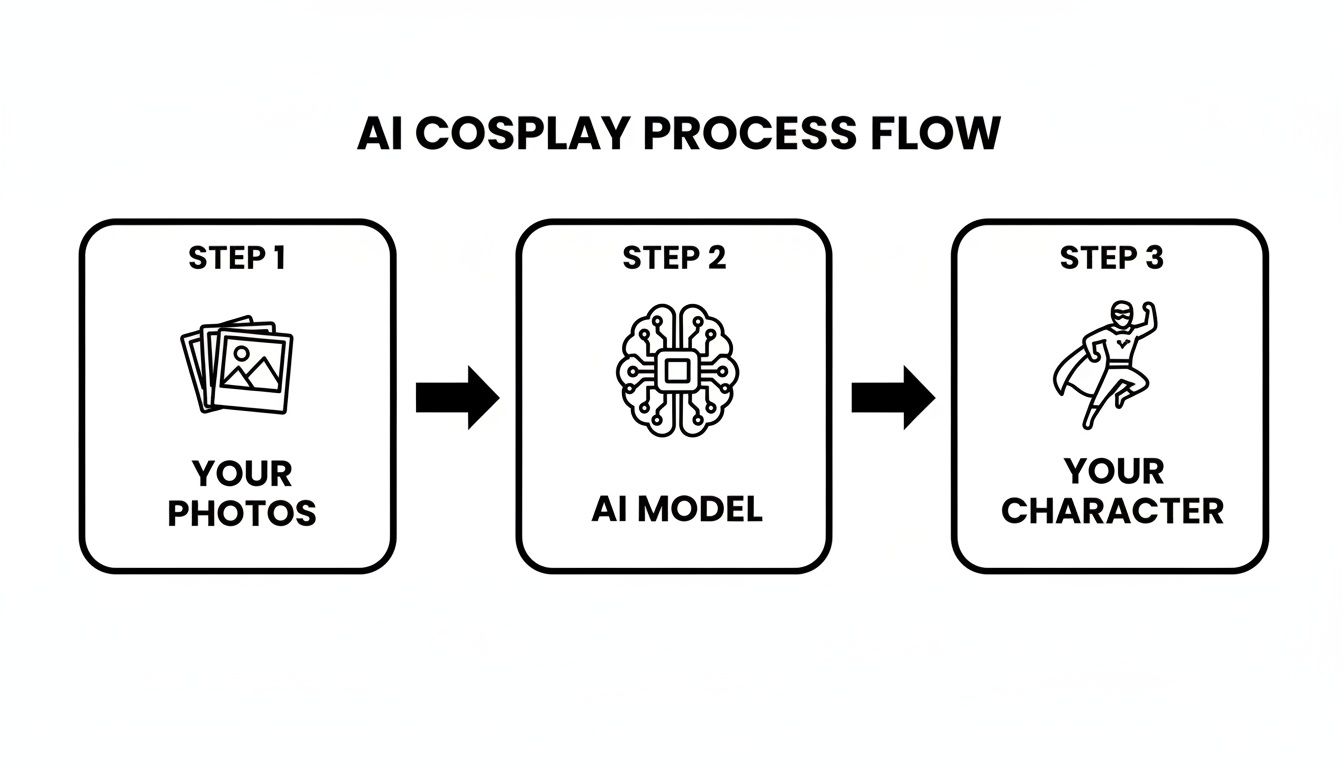
As you can see, the quality of your input directly impacts the AI model's ability to generate a convincing character.
The Dos and Don'ts of Photo Selection
Putting together the right set of images is part art, part science. The goal is to give the AI a complete visual dictionary of your face. Here's what I've learned works best for getting great training results.
What to Include in Your Training Set:
- A Variety of Angles: Mix it up with shots from the front, three-quarter views, and profiles. This helps the AI build a 3D understanding of your face.
- Different Expressions: Don't just give it the same smile in every picture. Include neutral expressions, a genuine laugh, and maybe even a serious or surprised look. This gives your AI a wider emotional range to work with.
- Varied Lighting Conditions: Perfectly lit studio shots are great, but don't only use those. Photos in natural daylight, soft indoor light, and even some with gentle shadows teach the AI how your face looks in different environments.
By feeding it this kind of variety, you’re building a much more robust and flexible model that can adapt to whatever wild scenario you throw at it in your prompts.
The better the training data, the less work you have to do in the prompting and editing stages. A well-trained model will naturally produce higher-quality images with fewer artifacts and a stronger likeness.
What to Avoid for Accurate Results
Just as important as what you put in is what you leave out. Certain things can really confuse the AI and water down the accuracy of your digital twin. You'll want to steer clear of these common mistakes.
Photos to Exclude from Your Training Set:
- Sunglasses or Heavy Glasses: If the AI can't see your eyes, it can't learn their true shape and color. It's that simple.
- Heavy or Theatrical Makeup: This is fine for the final cosplay, but your training photos should be as natural as possible. The AI needs to learn your base features first.
- Group Photos: The AI needs to focus only on you. Even if you crop yourself out, the image quality usually drops and the angle might be awkward.
- Low-Resolution or Blurry Images: Always, always use the clearest, sharpest photos you have. Pixelated shots just add noise and lead to muddy, generic-looking results.
In short, you want a clean dataset that shows your face clearly, without anything getting in the way. Once your images are ready, tools like AI Headshot Generators are great for the next step of actually transforming your photos into your desired character.
Practical Tips for a Perfect Photo Set
Ready to get started? I’ve found the sweet spot is around 10-20 high-quality images. This gives the AI enough data to learn from without overwhelming it. You don't need a pro photographer, either—good selfies work great. In fact, our guide on how to take cute selfies has some practical tips you can use right now.
Make sure to mix up your shots. A few close-ups focusing on your face and some chest-up portraits are a perfect combination. Using different backgrounds also helps the AI learn to separate your features from the environment. Follow these guidelines, and you’ll be setting the stage for the AI to create some truly stunning cosplay that looks uncannily like you.
Writing Prompts That Bring Your Character to Life
Alright, your custom AI model is trained and ready to go. Now the real fun begins. Think of yourself as the director and the AI as your high-tech camera crew. Your words are the instructions that will either lead to a masterpiece or a confusing mess.
A well-crafted prompt is the secret sauce that turns a generic, slightly-off image into a jaw-dropping, photorealistic AI cosplay portrait. It's about giving the AI crystal-clear instructions, leaving no room for it to guess what you want. This is a blend of artistic direction and technical precision.
The Anatomy of a Powerful AI Prompt
Building a great prompt is like putting together a recipe. You need the right ingredients, in the right order, to get that perfect result. For AI cosplay, a killer prompt usually has a few key components that layer detail upon detail.
- The Subject & Character: Start with the basics. Who are you? "A woman as Lara Croft" or "a man as Geralt of Rivia" sets the stage immediately.
- Costume & Wardrobe: Get descriptive. Don't just say "armor"; try "worn leather armor with intricate steel engravings." Use textures like "silken robes" or "gleaming chrome plating" to give the AI something tangible to work with.
- Setting & Background: Context is everything. Is your character in an "enchanted, moss-covered forest," a "gritty, neon-lit cyberpunk alley," or a "grand medieval throne room"? The background sets the entire mood.
- Lighting & Atmosphere: This is where the magic happens. Lighting dictates the entire feel of the shot. Words like "dappled sunlight filtering through the trees," "dramatic, high-contrast rim lighting," or a "soft, ethereal morning glow" can completely transform a scene.
- Artistic Style & Quality: Finish strong. This is your "make it awesome" command. Use phrases like "hyperrealistic photo," "cinematic film still," "ultra-detailed," and "8k" to tell the AI you want top-tier quality.
When you pull all these pieces together, you get something much more powerful. Instead of a basic "woman as an elf," you can create a vivid story: "cinematic photograph of a woman as an elven ranger in an enchanted forest, detailed leather armor, holding a bow, dappled sunlight, hyperrealistic, 8k."
If you really want to go down the rabbit hole of prompt creation, our complete guide on how to write an effective AI picture prompt is a great next step.
Real-World Examples to Get You Started
Let's see how this structure plays out in practice. Feel free to use these as templates and tweak them for your own characters.
Fantasy Warrior Prompt:
photograph of a man as a stoic Viking warrior, intricate chainmail armor, holding a battle axe, standing on a snowy mountain peak at dawn, dramatic golden hour lighting, ultra-detailed, cinematic
Sci-Fi Explorer Prompt:
portrait of a woman as a futuristic starship pilot, sleek silver jumpsuit with glowing blue accents, inside a minimalist spaceship cockpit, view of a nebula through the window, soft ambient lighting, photorealistic, sharp focus
Anime Hero Prompt:
full body shot of a person as a magical anime hero, vibrant pink and white dress, casting a glowing spell, cherry blossom petals floating in the air, fantasy anime art style, dynamic pose, highly detailed
Specificity is your best friend here. Notice we didn't just say "Viking"—we described him as "stoic" and placed him in a specific setting with defined lighting. This kind of detailed prompting is fueling incredible growth, especially in the anime cosplay costume market, which hit $500 million in 2025 and is projected to reach $1.8 billion by 2033. AI tools that help visualize concepts like these are a huge part of that trend.
Don't Forget About Negative Prompts
Sometimes, telling the AI what not to do is just as crucial as telling it what to do. That's where negative prompts come into play. These are simply keywords you add to steer the AI away from common pitfalls and unwanted visual artifacts.
Let's be honest, AI image generators can still get weird, especially with things like hands or intricate patterns. A negative prompt is your quality filter. To really get the hang of this, mastering the art of AI prompting is a must for guiding the AI effectively.
Common Negative Prompts to Have Handy:
- For Fixing Anatomy:
deformed, disfigured, extra fingers, malformed hands, blurry - For Boosting Image Quality:
low quality, jpeg artifacts, grainy, watermark, signature - For Removing Unwanted Styles:
cartoon, 3d render, text, ugly, boring
By simply adding a negative prompt like deformed hands, extra limbs, blurry face, low resolution to your request, you dramatically improve your chances of getting a clean, usable image on the first try. It’s a simple trick that gives you another layer of control, ensuring your final AI cosplay looks as polished as possible.
Diving Into Different AI Cosplay Styles and Genres
Once your custom model is trained, the real fun begins. You’ve basically built a creative engine that can put you into any world imaginable. This is where you get to play, stepping into the shoes of countless characters across any genre you can think of. With AI cosplay, the only limit is your own imagination.
Think of a tool like YourAIPhotographer as your personal idea factory. Its real strength is its flexibility. You can become a powerful fantasy sorcerer, a gritty cyberpunk android, or your favorite anime hero—all from the very same set of selfies. It’s a visual-first way of proving that any pop culture fantasy is just one good prompt away.
This collection of AI cosplay portraits shows just how different the results can be, shifting from classic fantasy to futuristic sci-fi in an instant.
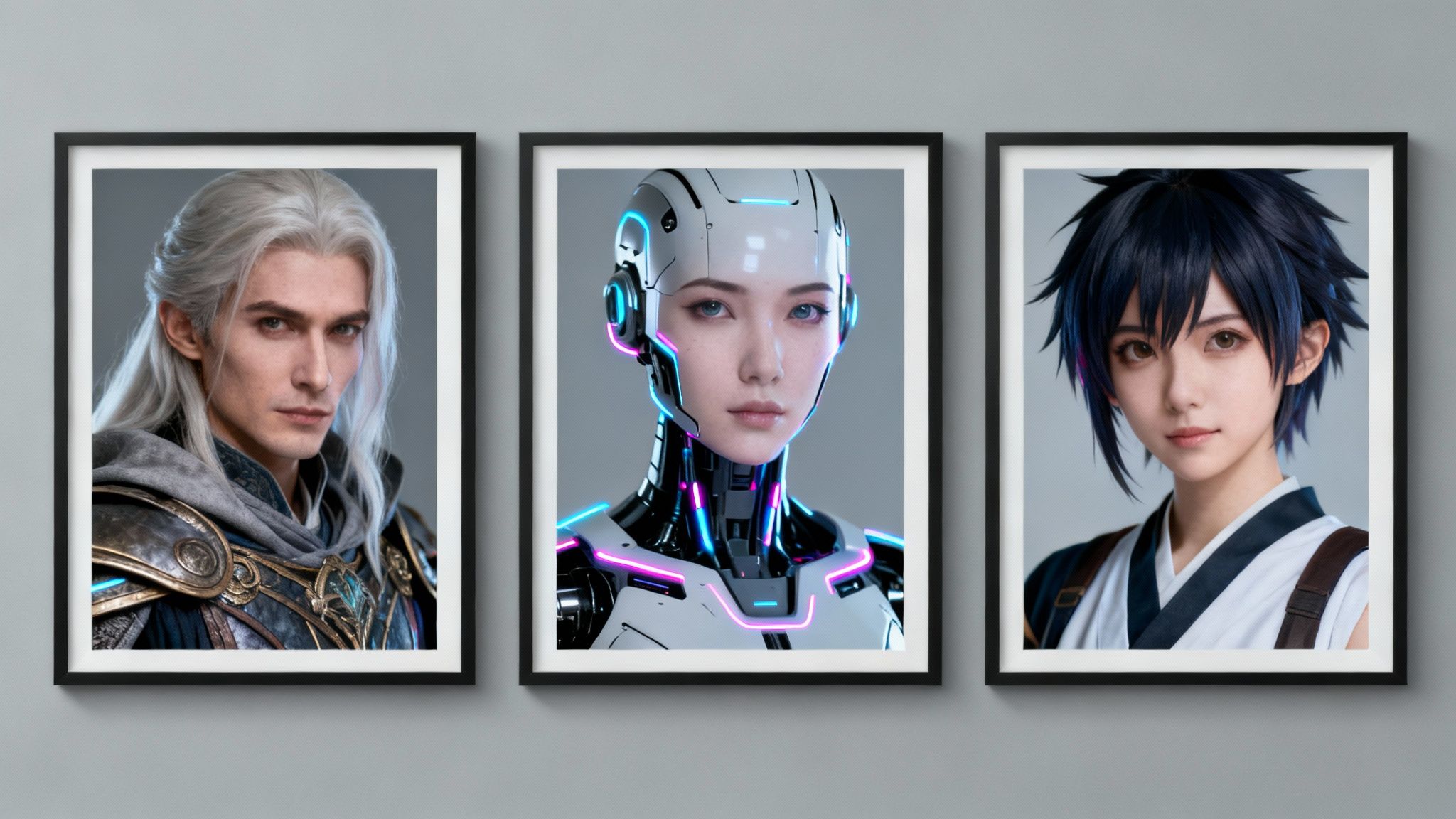
Each of these looks was generated with a carefully crafted prompt, which really highlights how well the tool adapts to different artistic styles.
Get Lost in Epic Fantasy Realms
Fantasy is a natural playground for AI cosplay. It’s a world filled with intricate armor, flowing robes, and magical backdrops that would cost a fortune and a ton of time to recreate in real life. But now? You can instantly become that elven archer or powerful warlock you've always wanted to be.
The secret to great fantasy AI cosplay is all in the details. You want to focus your prompts on rich textures and atmospheric lighting to really make the world feel alive.
- For a Powerful Sorceress: Think in terms of phrases like "ornate velvet robes with gold embroidery" and "casting a glowing arcane spell in a mystical library."
- For a Stoic Dwarven Warrior: Try describing "heavy, battle-worn steel plate armor" and "standing in a grand, torch-lit underground hall."
- For an Ethereal Elf: Use descriptive words like "delicate silver circlet, long white hair" and place them "in an ancient, sun-dappled forest."
By layering these details, you give the AI a vivid scene to build, which always leads to a more believable and immersive final image.
Explore Gritty Cyberpunk Futures
The cyberpunk genre, with its mix of high-tech gadgets and low-life grit, is another perfect fit for AI. We're talking neon-drenched cityscapes, glowing cybernetic parts, and wild futuristic fashion. These are all things you can easily describe in a prompt to create some seriously stunning portraits with a cool sci-fi edge.
One of my favorite things about AI cosplay is how it handles complex ideas so easily. Cybernetic implants, holographic screens, and sprawling futuristic cities are rendered just as simply as a basic portrait. It really opens up genres that used to be off-limits without a massive budget.
For this style, focus your prompts on the lighting and the tech. Use words that create the feeling of a gritty, advanced world.
Example Cyberpunk Prompt:
cinematic portrait of a woman as a cyberpunk mercenary, glowing neon tattoos, reflective chrome cybernetic arm, standing in a rain-slicked alleyway in Neo-Tokyo, dramatic blue and pink neon lighting, hyperrealistic photo, 8k
This kind of prompt is specific and packed with atmosphere, giving the AI clear directions on the mood, setting, and character details. If this genre sounds like your thing, you can find a ton of inspiration and style packs over on the YourAIPhotographer cyberpunk cosplay page.
Embody Your Favorite Anime and Manga Heroes
Anime and manga styles are a unique creative challenge because they blend real-world features with very stylized art. AI is surprisingly good at this. It lets you see yourself with the iconic hair, eyes, and outfits of your favorite characters while making sure the final image still looks like you.
This kind of creative AI use is actually becoming a big deal in the wider cosplay community. AI-powered personalization is a huge reason the cosplay clothing market is projected to grow from USD 5,390.1 million in 2025 to USD 9,207.2 million by 2035. Tools that let creators visualize exactly what they want are changing the game for everyone. You can dig into more of these cosplay market trends and advancements if you're curious.
To nail a convincing anime-style AI cosplay, try mixing photorealism with artistic keywords.
- Specify the art style: Include phrases like "in the style of a modern anime film" or "Studio Ghibli inspired."
- Describe key features: Don't be shy! Mention "spiky silver hair," "large, expressive green eyes," or "classic shonen hero outfit."
- Set a dynamic scene: Use action-oriented phrases like "in a dynamic action pose" or "surrounded by magical energy particles."
When you combine these elements, you get a beautiful hybrid style that captures the spirit of the character while still being recognizably you. It opens up a whole new world of creative tributes.
Advanced Techniques for Photorealistic Images
So, you've gotten the hang of basic prompting and are pulling some pretty cool AI cosplay images. Ready to go from good to "wow, is that a real photo?" This is where the real artistry begins.
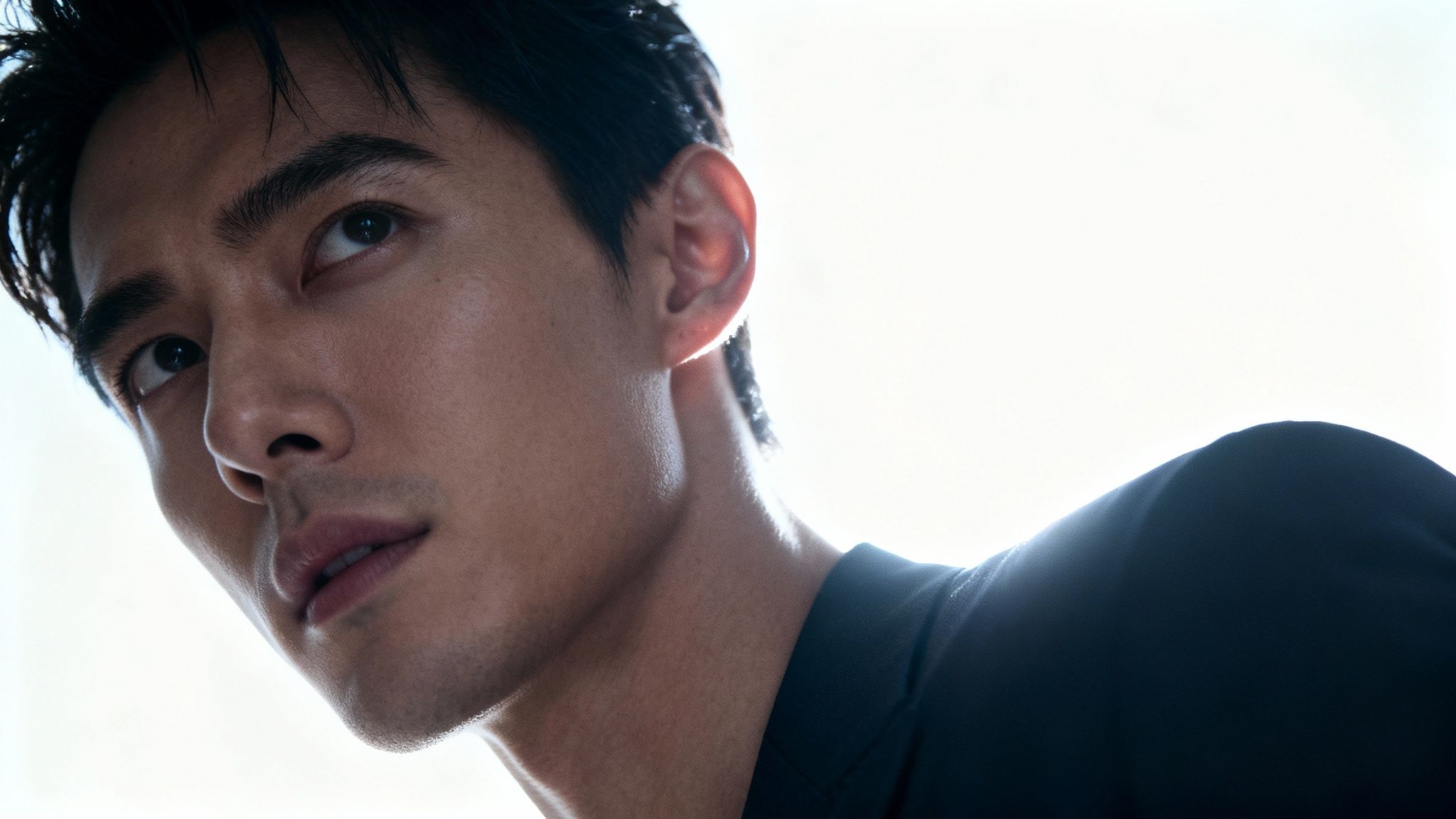
Moving past simple character descriptions means you start thinking like a photographer. You're not just telling the AI what to create; you're directing a virtual photoshoot. Every detail—from the camera angle to the glint of light in your character's eyes—is under your control.
True photorealism hinges on the little things, the subtle cues our brains instantly register as real. It's not about stuffing more words into your prompt, but about choosing the right ones. With a platform like YourAIPhotographer, you have the precision to craft images that look like they came straight from a high-end studio.
Controlling Composition and Lighting
What separates a flat, boring portrait from a dynamic, emotional one? Almost always, it comes down to composition and lighting. Instead of letting the AI make a random choice, you need to take the director's chair and call the shots.
- Camera Angles: A "low-angle shot" instantly makes your character feel powerful and heroic. Flip to a "high-angle shot" for a more contemplative or vulnerable mood. Want to add a bit of chaos or tension? Try a "dutch angle."
- Shot Types: Are you going for an intimate "close-up portrait" to capture raw emotion? Or do you need a "full-body action shot" to showcase that incredible costume design? Be specific.
- Lighting Modifiers: This is my favorite part. Using terms like "dramatic rim lighting" carves your character out from the background with a brilliant halo. "Soft window lighting" gives you a gentle, natural look. For a moody, atmospheric scene, nothing beats "cinematic volumetric lighting" to make those dusty light rays pop.
My go-to trick for instant drama is adding "backlit silhouette" to a prompt. It creates a powerful, mysterious mood and forces the AI to focus on strong shapes and high-contrast lighting, which often produces stunning results.
Simple Post-Processing for a Flawless Finish
Even the most amazing AI generations can have tiny flaws—a weird bit of texture, a slightly off color, or some random artifact in the background. A few minutes of post-processing can take a 9/10 image and make it a perfect 10.
You don't need to be a Photoshop guru, either. Many free apps on your phone or computer can handle these small tweaks beautifully.
- Color Correction: Give the saturation a little boost to make the colors pop, or play with the temperature to make a scene feel warmer or cooler.
- Sharpening: A touch of sharpening can make all the difference, bringing out the fine details in a costume's fabric or the character's eyes.
- Healing Brush: Tools like a spot heal or clone stamp are your best friends for zapping tiny, distracting artifacts without messing up the rest of the shot.
These little touches are what separate amateur results from professional-grade AI art. Of course, starting with a well-trained model makes a world of difference. You can dive deeper into that process with our guide on how to train an AI model. It will minimize these issues from the start, but a final polish is always a good idea.
Troubleshooting Common Issues
As you push for more complex and realistic scenes, you're bound to hit a few of the classic AI snags. Wonky hands, inconsistent faces—we’ve all been there. The trick is to refine your approach, not get frustrated.
If your character's face doesn't quite look like you from one image to the next, your prompt might be too busy. Try simplifying it to focus more on the character and less on a chaotic background. Sometimes, just regenerating the image with a different seed number is enough to fix it.
It's amazing to think about how this technology connects to the real world. The cosplay supplies market is booming, projected to hit USD 5.34 billion by 2032, and AI is becoming a huge part of designing those hyper-realistic accessories. As we get better at creating these digital props, the demand for physical versions grows. You can read more about the growing cosplay supplies market to see just how intertwined tech and crafting have become.
Answering Your AI Cosplay Questions
Diving into AI cosplay is exciting, but it's totally normal to have a few questions before you start. It's a pretty straightforward process, but knowing a few key details can make all the difference in creating images you're truly proud of.
Let's walk through some of the most common questions creators have when they're just getting started. Think of this as a quick-start guide to getting the best results from platforms like YourAIPhotographer.
How Many Photos Do I Need to Train My Model?
I always tell people to aim for 10-20 high-quality photos. This range seems to be the sweet spot. It gives the AI enough visual data to really understand your facial features from all sorts of angles and in different lighting.
Think of it like this: you're giving the AI a complete 360-degree map of your face. The more varied and clear the photos, the more realistic and versatile your final AI cosplay generations will be.
Can I Really Cosplay as Any Character?
Yep, pretty much! Whether you're dreaming of being a well-known superhero or a character you just made up, you can bring it to life. The magic is all in how you write your prompt.
For famous characters, just using their name is usually enough to get the AI on the right track. If you're creating something more unique, you’ll just need to get a bit more descriptive about the costume, hair, and other signature details. Your imagination is the only real limit here.
What About the Ethics of AI Cosplay?
This is a big one, and it's smart to think about it. For personal projects, you're generally in the clear. The conversation gets more nuanced when you start sharing your work online.
My personal rule of thumb is simple: never generate images of other real people without getting their explicit permission first. If you're inspired by a particular artist's style, it's always good form to give them a shout-out if you post it. And, of course, be mindful of copyrights when you're working with trademarked characters.
How Do I Fix Weird Hands or Other Glitches?
Ah, the classic "AI hands" problem. It's a well-known quirk in image generation, but don't worry, it's usually an easy fix.
- Regenerate: Sometimes, just running the prompt again with a different seed number is all it takes.
- Prompting Tricks: Try adding phrases like 'perfect hands' or 'detailed hands' to your main prompt. You can also use a negative prompt to specifically exclude things like 'deformed hands, extra fingers, mutated hands'. This helps a ton.
- Quick Edits: For tiny mistakes that remain, a quick touch-up in a simple photo editor or even a clever crop can make the image perfect.
Ready to see yourself as your favorite character? YourAIPhotographer makes it easy to step into any world you can imagine. Explore our curated styles and start creating your own stunning AI cosplay portraits today. Discover all the possibilities on the YourAIPhotographer cosplay page.