
Your Guide to the Best AI Makeup Generator Technology
Discover how an AI makeup generator works, from virtual try-ons to creating stunning new looks. Learn to use AI for beauty, content creation, and more.
Table of Contents
Ever wondered how you can try on a full face of makeup without ever touching a brush? That’s the magic of an AI makeup generator. It’s a tool that uses artificial intelligence to digitally apply cosmetics to a photo, letting you play with different looks in seconds. Think of it as your own personal makeup artist, ready to give you a makeover—from subtle touch-ups to dramatic new styles—with just a few clicks.
What Is an AI Makeup Generator
At its heart, an AI makeup generator is a clever mix of digital art and smart technology that lets you apply, test, and even invent cosmetic looks on a photo. It’s like having a makeup artist living inside your computer or phone, ready to go whenever inspiration strikes.
So how does it work? The whole process leans on two powerful pieces of tech: computer vision and generative AI. First, computer vision acts like the artist's eye. When you upload a photo, it scans your face and maps out all your features with incredible accuracy—locating the precise position of your lips, eyes, eyebrows, and cheekbones. Once it has a solid understanding of the canvas (your face), the generative AI steps in to do the creative work.
How the Digital Transformation Happens
This is where things get really interesting. The AI uses sophisticated algorithms, often built on models called Generative Adversarial Networks (GANs), to generate and overlay the makeup. It’s not just slapping a flat color onto your picture. The AI actually understands things like texture, lighting, and shadow to make the application look shockingly realistic. It can create the look of a glossy lipstick, a shimmery eyeshadow, or a matte foundation that blends seamlessly with your skin tone and facial structure.
If you're curious about the bigger picture, it helps to understand what AI image generators entail, because these makeup tools are really just a specialized version of that broader technology.
This flowchart breaks down the simple but powerful workflow, from the moment you upload a photo to the AI recognizing your features and applying the digital makeup.
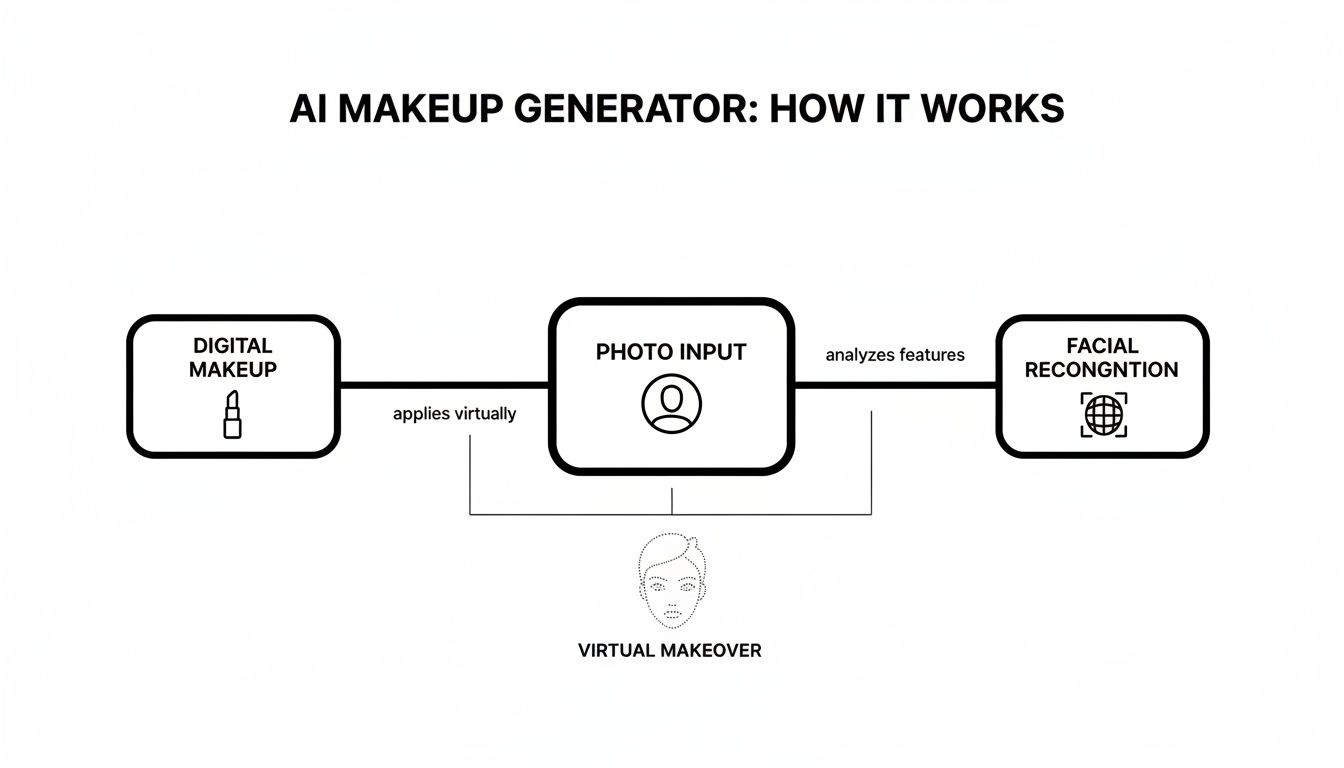
The process shows just how smoothly the AI combines facial recognition and creative application to produce a finished, professionally styled image.
More Than Just a Filter
This isn't your average social media filter that just lays a flat image over your face. A true AI makeup generator understands depth and dimension, making the result far more believable. This kind of advanced application is a huge part of the growing beauty-tech space.
In fact, the AI in beauty and cosmetics market is expected to jump from USD 4.4 billion in 2025 to roughly USD 9.44 billion by 2029. This boom is all thanks to the demand for personalized tools like digital makeup and other forms of virtual try-on technology.
Ultimately, an AI makeup generator gives you a fantastic way to visualize new looks, test out products before you commit to buying them, or create eye-catching content without the time, mess, and cost of a real-life makeup session.
The Power of Virtual Makeup for Brands and Creators
It's one thing to understand the tech behind an ai makeup generator, but the real magic happens when you see how it's being used out in the wild. For beauty brands and creators, these aren't just fun toys—they're becoming essential tools for solving old problems, boosting sales, and sparking new ideas.
Think about the biggest hurdle for any online beauty brand: selling a lipstick or foundation to someone who can't physically try it on. Virtual try-on tech smashes that barrier. Suddenly, shoppers can see exactly how a new shade of red lipstick looks on their face, right from their couch. This gives smaller online brands a fighting chance against the big department stores, letting them offer a personalized, interactive experience that builds serious confidence in a buyer.
And this isn't just about making shopping easier. It has a real, measurable impact on the bottom line. When people can see what they’re getting, they’re much more likely to click "buy" and much less likely to send it back.
Boosting Sales and Reducing Returns
The numbers don't lie. The virtual makeup try-on market is expected to balloon from USD 6.29 billion in 2024 to an incredible USD 18.26 billion by 2030. This growth is happening for a simple reason: it works. Some brands have seen a 2.4x increase in the likelihood of a purchase after a customer uses a virtual try-on tool.
Virtual makeup isn't just a marketing gimmick; it's a direct path to higher conversion rates and happier customers. By taking the guesswork out of buying online, brands build trust and slash the high cost of product returns.
For influencers and content creators, the perks are just as big. An ai makeup generator can be a massive time-saver. Imagine trying to show off ten different lipstick shades for a sponsored post. That used to mean hours of applying, removing, and reshooting. Now, a creator can generate those looks in minutes, letting them stay on top of trends and keep their feed looking fresh.
Content Creation at Scale
This technology gives creators the power to churn out tons of beautiful, high-quality images without needing a single physical product or a professional makeup artist on standby. It's a total game-changer for anyone trying to maintain a polished look online, whether they're just designing a catchy thumbnail or creating a full digital lookbook. We're even seeing the rise of completely AI-generated influencers, who build their entire look with these kinds of tools.
Beyond just try-ons, AI is also changing how brands market their products, with some creating incredibly realistic AI-powered UGC ads that connect with people in a way traditional ads can't. At the end of the day, AI makeup tools are leveling the playing field for everyone from global corporations to solo creators.
How to Use YourAIPhotographer with the AI Makeup Pack for Virtual Makeup Try-On
Ready to give your photos a professional touch without spending hours in a makeup chair? Using the YourAIPhotographer AI Makeup Pack is a fast and easy way to experiment with virtual makeup looks. In just a few clicks, you can take a simple selfie and transform it into a polished, stunning portrait.
Let's walk through the process, step by step.
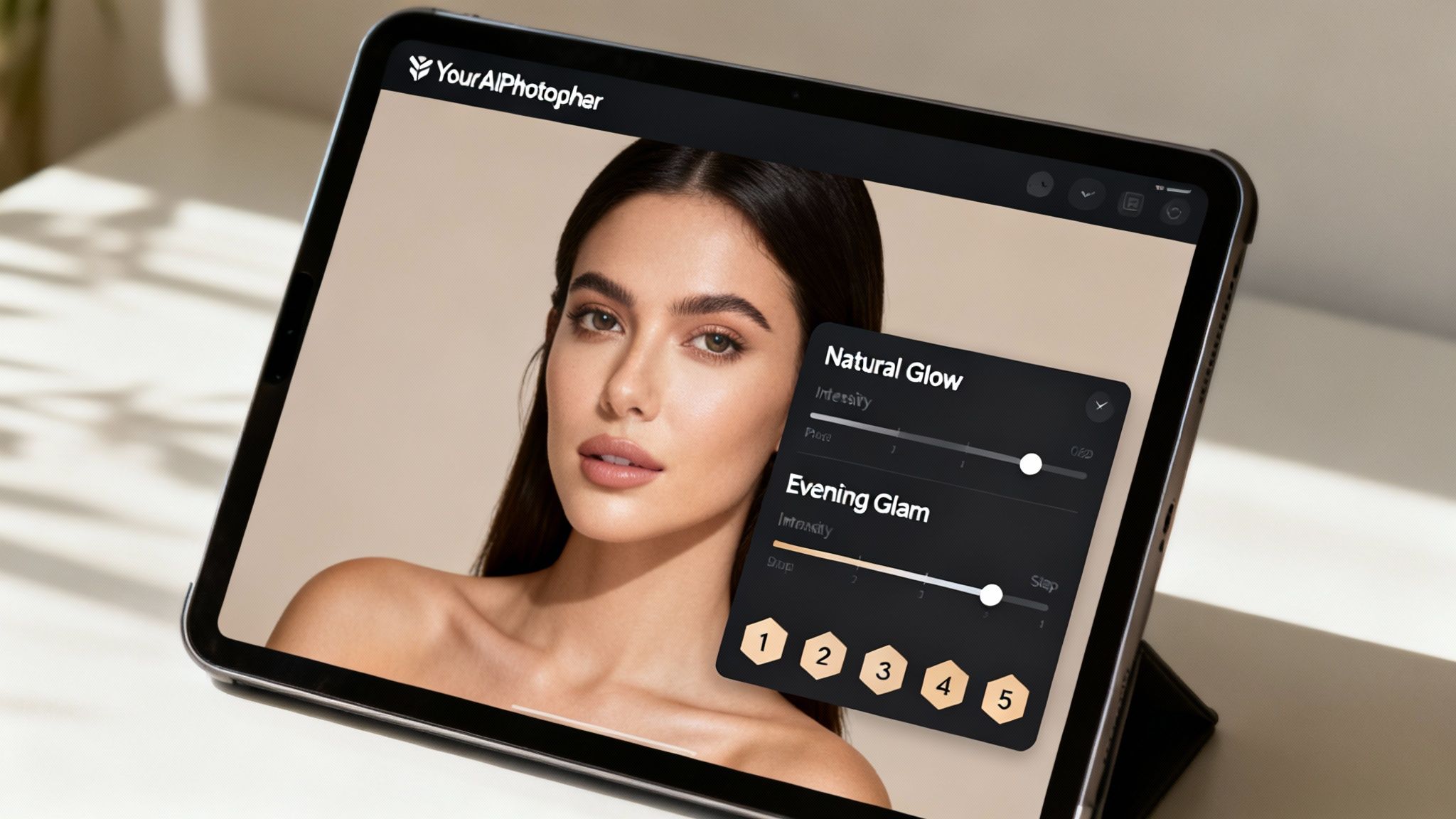
The entire experience is designed to be intuitive, putting a digital makeup artist right at your fingertips.
Step 1: Start with a Great Photo
The quality of your final image hinges entirely on the photo you start with. A good source photo is the canvas for your AI makeover.
- Choose a High-Resolution Image: The sharper your picture, the better the AI can detect your facial features with precision.
- Find Good Lighting: Soft, even lighting is your best friend. Try facing a window to avoid harsh shadows that can throw the AI off.
- Keep Your Expression Neutral: A simple, relaxed, forward-facing pose helps the makeup apply smoothly and look completely natural.
Think of it this way: the better the canvas, the more beautiful the painting.
Step 2: Navigate to the AI Makeup Pack
Once you've uploaded your photo to the YourAIPhotographer platform, you'll find our tools organized into "Packs" designed for specific goals.
Look for the AI Makeup Pack in the tool library. This is your creative hub for virtual makeup, filled with a curated selection of professional styles.
Step 3: Choose a Style for Virtual Try-On
This is where the real fun begins. The AI Makeup Pack is loaded with a variety of pre-designed looks that you can apply with just one click, instantly trying them on your photo.
Each style is a complete, professionally crafted makeup application. You can test out looks like:
- Natural Glow: A subtle, everyday look that brightens and enhances your features.
- Evening Glam: Perfect for a night out, with bolder eyeshadow and more defined contouring.
- Bold Lip: A classic style that puts the focus on a vibrant lip color while keeping everything else elegantly understated.
Feel free to click through the different options. It’s the easiest way to see what flatters your photo and matches the vibe you're going for.
Step 4: Fine-Tune Your Look
The preset styles are a fantastic starting point, but the magic is in the details. After applying a style, you can adjust individual elements to perfectly suit your taste.
The best virtual makeovers blend AI efficiency with a personal touch. Adjusting intensity levels allows you to tailor a preset look, ensuring the final image feels authentic to your personal style.
Most tools offer a simple slider to dial the overall intensity up or down. You can also tweak specific parts—maybe change the lip shade, deepen the eyeshadow, or soften the blush. This is how you make the look truly your own. If you want to get more technical, you can learn all about how to create AI photos on our platform.
To get the most out of the tool, here are a few best practices to keep in mind.
Getting the Best Results with YourAIPhotographer Makeup Pack
This table summarizes how to prepare your photo and apply AI makeup to achieve a professional and realistic look.
| Best Practice | Why It Matters | Example Action |
|---|---|---|
| Use a Clear, Front-Facing Photo | The AI needs an unobstructed view of your face to accurately map features like eyes, lips, and cheekbones. | Take a selfie with your face directly pointed at the camera, avoiding side angles or hair covering your eyes. |
| Ensure Even, Natural Lighting | Harsh shadows or bright hotspots can confuse the AI, leading to uneven makeup application. | Stand facing a window during the day for soft, diffused light that illuminates your whole face. |
| Start with a "Clean" Face | Applying virtual makeup over existing heavy makeup can sometimes look unnatural. A bare or lightly made-up face is ideal. | Use a photo where you have minimal or no makeup on to give the AI a blank canvas to work with. |
| Adjust Intensity Gradually | Pushing sliders to 100% right away can look artificial. Subtle adjustments often yield the most realistic results. | Apply the "Evening Glam" style, then reduce the overall intensity slider to 70% for a more believable effect. |
| Experiment with Different Styles | Don't settle on the first look. A style you wouldn't normally try might surprisingly be the perfect fit for a particular photo. | Try both the "Natural Glow" and "Bold Lip" on the same headshot to see which one best complements your expression. |
Following these simple guidelines will help ensure your AI-enhanced photos look polished and authentic every time.
Step 5: Save and Share Your New Look
Once you’re happy with the result, all that’s left to do is save your masterpiece. YourAIPhotographer lets you export your new image in high resolution, ready for anything.
Whether you're updating your professional headshot, creating a new social media profile picture, or developing content for your brand, your enhanced photo is ready to impress. The entire process is fast, easy, and gives you a flawless finish without any of the mess.
Creating Custom Looks with AI Prompting
While one-click styles are a great starting point, the real magic happens when you take the driver's seat and start using text prompts. This is where you go from simply choosing a look to actually designing one from scratch, using nothing but your words.
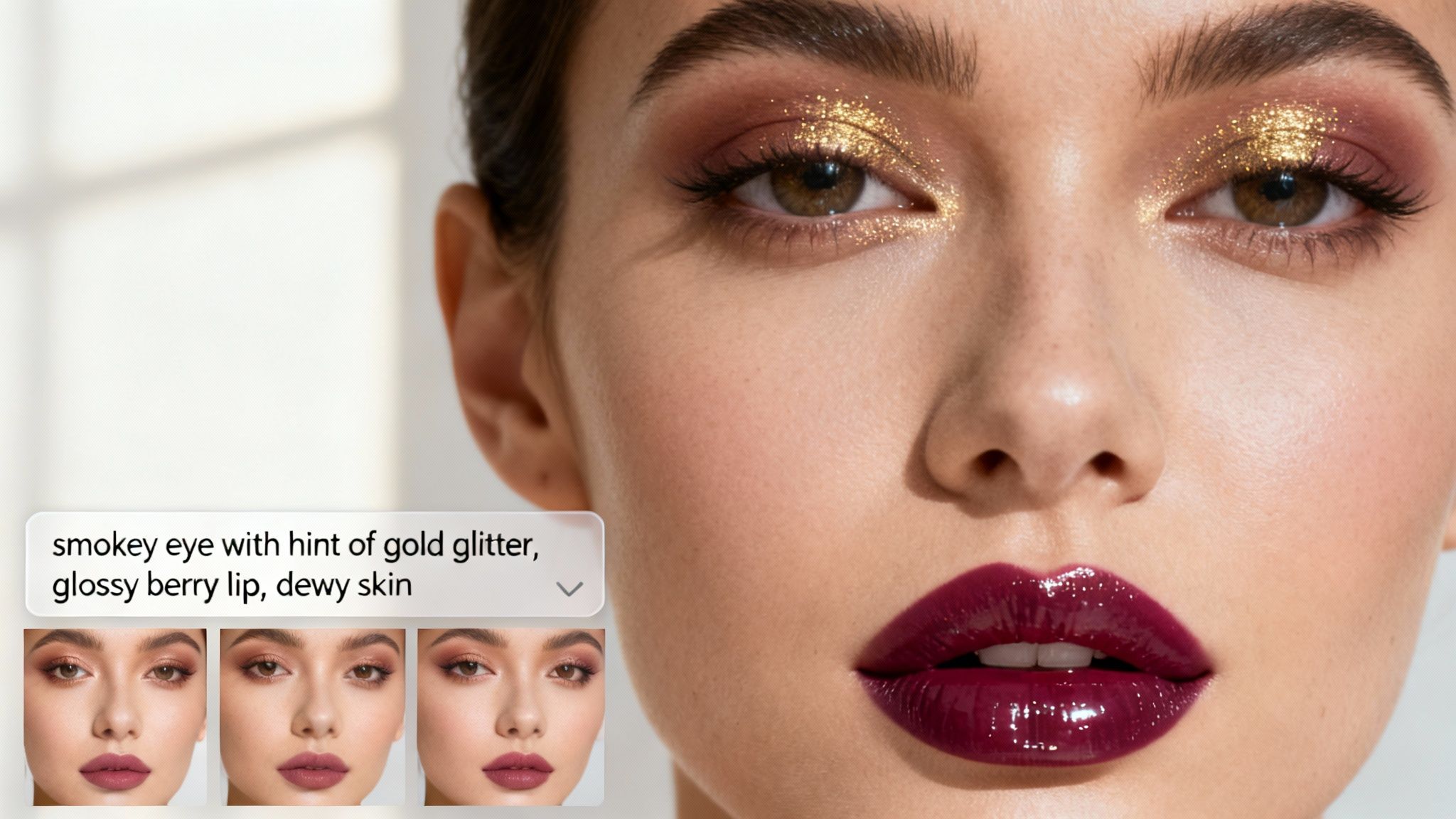
Think of yourself as a creative director giving instructions to a world-class makeup artist. You describe the exact look you're envisioning, and the AI brings it to life on your photo. It’s the ultimate way to get a truly personalized result.
Prompting 101: The Art of Description
Writing a good prompt is all about the details. The AI is listening to every word, so the more specific and descriptive you are, the closer it will get to what's in your head. The best prompts usually break the look down into its key parts.
A simple framework I like to use is:
- Overall Vibe: Start with the big picture. Is it an "ethereal fairy look" or "90s grunge makeup"?
- Key Features: Call out the eyes, lips, and skin individually.
- Textures and Finishes: This is crucial. Use words like "matte," "glossy," or "shimmery."
For instance, you could say "smokey eye and a red lip." That works, but it's vague. A much better prompt would be: "Dramatic smokey eye with silver glitter, sharp winged eyeliner, glossy cherry-red lipstick, and a dewy foundation." See the difference? The second prompt gives the AI so much more to work with, leading to a far richer and more detailed image.
If you want to go even deeper on this, we have a complete guide on how to create the perfect AI picture prompt.
Refining Your AI Makeup Prompts
Nailing the perfect look is often a process. It’s rare to get it exactly right on the first try. The trick is to start with a solid prompt and then tweak it based on what you get back. Don't be afraid to experiment!
Think of each prompt as a conversation with the AI. Your first attempt starts the dialogue, and each refinement brings you closer to the perfect look. The more specific your feedback, the better the final outcome.
Here are a few tips I've learned for refining prompts:
- Be Specific with Colors: Instead of just "pink lipstick," try "dusty rose lipstick" or "vibrant hot pink lipstick."
- Describe Textures: Words like
matte,glossy,satin,metallic, andglittercan completely change the feel of the makeup. - Add Intensity Modifiers: Use terms like
subtle,soft,bold, ordramaticto tell the AI how strong you want the effect to be.
Creative Power Words for Makeup Prompts
To get your creativity flowing, here are some powerful words that can add a ton of precision and style to your makeup prompts. Mix and match them to see what you can create.
- For Eyes:
Smokey,winged,cat-eye,shimmery,metallic,defined brows,voluminous lashes - For Lips:
Glossy,matte,satin,velvet,ombre,berry,nude,vibrant - For Skin:
Dewy,matte,glowing,sun-kissed,contoured,airbrushed - For Styles:
Ethereal,grunge,vintage,futuristic,bohemian,glam-rock
By combining these kinds of descriptors, you can generate a nearly endless variety of looks. You're not just editing a photo; you're turning it into a unique piece of art that perfectly matches your vision.
The Future of AI in the Beauty Industry
The ability to apply makeup with an AI makeup generator is really just the tip of the iceberg. This technology is opening the door to a massive shift in how the beauty industry works, from the way products are dreamed up to how brands connect with their customers.
Generative AI is quickly evolving past simple photo edits. It's becoming a core engine for innovation and growth.
Instead of just slapping on existing makeup looks, AI is now helping design entirely new cosmetic products. It can analyze market trends, sift through customer feedback, and even look at chemical formulations to help brands predict the next "it" lipstick shade. This speeds up product development and cuts down on the expensive guesswork.
A More Personalized and Creative Landscape
What's really exciting is how this technology is leveling the playing field for smaller brands and individual creators. Professional-quality content, once only possible for companies with massive marketing budgets, is now within anyone's reach.
An independent creator can now whip up an entire marketing campaign from their laptop, producing visuals that can go toe-to-toe with global brands. This is fostering a more diverse and creative beauty world where unique ideas can find an audience without a huge upfront investment.
Want to go deeper into how AI is changing content creation? Check out our guide on AI image manipulation.
Generative AI is not just a tool for enhancement; it's a partner in creation. From hyper-personalized product recommendations to designing novel cosmetics, AI is reshaping the entire value chain of the beauty industry.
The economic impact is staggering. Some analyses project that generative AI could inject $9–$10 billion into the global economy just through its effect on the beauty industry. This value comes from more efficient content production, hyper-personalized marketing, and new AI-driven retail experiences that are becoming non-negotiable for growth.
You can learn more about how beauty brands are scaling generative AI on mckinsey.com.
Ultimately, the AI makeup generator is a key player in a much larger industry revolution. It’s part of a fundamental shift toward a more intelligent, personalized, and efficient future for beauty.
Got Questions? Let's Talk AI Makeup.
As AI makeup tools become more common, you probably have a few questions. How does this all work? Is it safe? Can I really use it for my business? Let's clear up some of the most common queries.
Is It Safe to Upload My Photo to an AI Makeup Generator?
That's a smart question to ask. When you're uploading personal photos, you absolutely should be thinking about safety. The simple answer is to stick with reputable platforms that care about your privacy.
Before you upload anything, look for a clear privacy policy. A trustworthy service will tell you exactly how they handle your photos—how they're used, where they're stored, and what they do to protect them. If a site feels unprofessional or hides its terms of service, it's best to stay away. At YourAIPhotographer, for example, we built our platform with security as a top priority, so you know your images are in good hands.
Can AI Makeup Generators Work on All Skin Tones and Face Shapes?
They’ve gotten so much better at this. Early AI struggled with diversity, but today’s models are trained on massive datasets filled with different skin tones, ethnicities, and facial structures. This training is what allows the AI to accurately see your features and apply makeup that looks like it belongs there.
That said, the AI still needs your help. The quality of your photo makes a huge difference. A clear, well-lit picture where your face is front and center gives the AI the best possible canvas to work with. Good lighting helps it understand the contours of your face, leading to a much more precise and flattering result, no matter your skin tone.
Inclusivity in AI isn't just about being fair—it's about being accurate. A truly great AI makeup generator doesn't just slap a filter on your face. It recognizes what makes you unique and enhances it, ensuring the virtual makeup complements your features instead of covering them up. That’s what separates a professional tool from a generic one.
Can I Use AI-Generated Makeup Images for My Business?
Absolutely! This is one of the most powerful uses for these tools. If you're an influencer, a small business owner, or a marketer, you can create stunning, professional-looking visuals without booking a single photoshoot.
Just be transparent with your audience. A simple heads-up that a look was created with AI helps build trust and manages expectations. Also, make sure to double-check the terms of service of whatever tool you're using. Most professional platforms like YourAIPhotographer give you full commercial rights to the images you create, freeing you up to use them in ad campaigns, on your website, or all over social media.
How Realistic Can the Results From an AI Makeup Generator Look?
Honestly, the results can be shockingly realistic. It really comes down to two things: the quality of the AI and the quality of your photo.
The best platforms use incredibly sophisticated algorithms that understand how light, shadow, and texture work together. This is what allows them to create looks that blend perfectly with your skin. But the AI can only work with what you give it. A high-resolution photo taken in good, even lighting is key. It gives the AI the detail it needs to add everything from a subtle shimmer on an eyeshadow to the glossy finish on a lipstick, creating a final image that looks just like a professional headshot.
Ready to see for yourself? Dive into YourAIPhotographer and discover how easy it is to create the perfect look for your headshots, brand, or social media. Start creating with YourAIPhotographer.