

How to Scale Content Creation With Automation and AI Tools
Learn how to scale content creation with smart workflows, AI tools, and practical tips to double your output and ROI without sacrificing quality.
Table of Contents
Scaling content creation means producing more without sacrificing quality. It sounds straightforward but really comes down to a clear framework and consistent habits.
Quick Roadmap To Scale Content Creation
Start by grouping similar tasks, automating what you can, defining who does what, planning ahead, and tracking returns. These five moves helped small teams double output in just a few weeks.
- Batching tasks cuts context switching.
- Automating pipelines frees several hours each week.
- Defining Roles keeps handoffs smooth.
- Content Calendars align topics with peak engagement.
- Measuring ROI drives smarter decisions.
Key Steps To Scale Content Creation
Below is a quick look at these core actions and why they matter.
| Key Action | Benefit |
|---|---|
| Batching Tasks | Speeds Up Production |
| Automating Pipelines | Cuts Manual Workload |
| Clear Roles | Enhances Accountability |
| Content Calendar | Improves Planning |
| Measuring ROI | Drives Data-Backed Choices |
This table highlights how each step directly impacts your workflow.
Small Team Case Study
A three-person social agency moved from eight to sixteen weekly posts in under a month. They began by mapping core content pillars, then blocked two hours daily for writing and AI-driven visuals.
Bringing in YourAIPhotographer slashed graphic creation time by 70%. That extra capacity let the team refine captions and experiment with formats without overtime.
Automating With AI
Next, they wired up Zapier to fetch AI images, resize them, and upload assets into their CMS via an HTTP trigger. The result was five extra hours every month—and a unified brand look across channels.
- Use Zapier or Make to connect AI visuals to your content hub.
- Queue assets in batches with Buffer or Hootsuite.
- Store text snippets in Templafy or a similar library for quick reuse.
The graphic below summarizes these actions and the time savings they delivered.

By 2025, the creator economy topped $250 billion, and it’s on track for $480 billion by 2027. Read the full analysis on content-creator market growth on Spiralytics.
You might be interested in our deep dive on best AI tools for content creators.
Next Actions
Choose one tactic from the roadmap and put it into practice this week. Track a simple metric—like total posts or hours saved—and compare after two cycles. Tweak as you go until you hit a steady growth rhythm.
Small changes, repeated over time, compound into major wins. Keep moving forward without overcomplicating your process.
Setting Up Efficient Content Workflows

Start by mapping every step in your process. Spotting bottlenecks early makes scaling possible.
Boutique agencies and in-house teams often adopt Kanban boards. They offer a clear view of tasks and cut through decision fatigue. Meanwhile, a shared calendar brings deadlines into focus—teams see a 30% drop in late handoffs when due dates are visible at a glance.
- Kanban Boards Provide End-to-End Visibility
- Shared Calendars Align Publishing Dates With Peak Engagement
- Collaborative Templates Standardize Briefs, Drafts, and Approvals
Roles And Responsibilities
Defining who does what trims review cycles and keeps your brand voice consistent. In one case, assigning a single owner for drafts cut approval time by 50%.
- Authors craft a brief with keywords and audience notes.
- Designated reviewers offer targeted feedback.
- The owner finalizes content and schedules it for publication.
Preventing Handoffs
Drafts often stall when no one’s assigned. Automatic reminders in your project tool nudge reviewers before deadlines arrive.
- Asana for clear task assignment and progress tracking
- Trello cards with due-date notifications at each stage
- Notion checkboxes to confirm every step is complete
Automations And Checklists
Automate the routine to focus on creativity. Simple scripts can route drafts, format images, or ping team members when work is ready.
These automations cut manual handoffs and free up your team. By 2025, roughly 67% of small business owners and marketers will use AI for content, with 86% saving at least one hour on creative tasks. Learn more at Digital Silk.
Calendars And Templates
A single timeline for briefs, drafts, and reviews keeps everyone on the same page. Templates lock in quality, even under tight deadlines.
Templates For Speed
When the pace picks up, your template library becomes invaluable. Include these fields to avoid last-minute scrambles:
- SEO keywords in every brief
- Brand voice notes in draft templates
- Version-control fields for tracking edits and dates
Check out our guide on AI content creation tools for more workflow ideas.
AI Adoption Across Content Formats
Here’s a quick look at how marketers are using AI across different content types:
| Content Format | Marketers Using AI |
|---|---|
| Blog Posts | 72% |
| Social Media Posts | 68% |
| Email Newsletters | 55% |
This table highlights where AI is making the biggest impact today.
Case Study Highlights
One in-house team ditched endless email threads in favor of a single Notion board. Errors before publishing fell by 40%, and they doubled output without adding headcount.
Clear processes and automations not only save time but also maintain high standards as teams grow.
Key Takeaways
- Visualize tasks with boards and calendars.
- Use templates and checklists to remove guesswork.
- Automate reminders and file routing for faster handoffs.
- Measure results and refine each step continuously.
Next Steps
Review your current workflow to spot friction points. Map one content type from brief to publish. Launch a Kanban board with your team this week, then introduce one automation per sprint. Track time saved, gather feedback, and adjust priorities.
Combine this framework with YourAIPhotographer to automate image generation and review. Embrace steady improvement to scale your content production without growing your headcount.
Building Automated Publishing Pipelines
Connecting your CMS, social scheduler, and email platform turns scattered tasks into a unified workflow. This kind of automation can shave off hours every week, so your team spends more time ideating and less time copying and pasting.
Start by choosing tools with solid APIs or built-in integrations. Fill any gaps with simple scripts that format and dispatch content automatically.
Finally, don’t skip the human checkpoints. Embed approval triggers that pause distribution until someone signs off. Once you’ve got that green light, everything flows right back into the pipeline.
Selecting Scheduling Platforms
Tools like Buffer, Hootsuite, and Mailchimp each have their sweet spots. Here’s what matters most:
- API Access for direct content pushes
- Template Management to keep your branding consistent
- Analytics Dashboards to track what’s working
One team we know cut 12 hours weekly by feeding blog posts straight into social media queues—no more manual copy-pastes or missed updates.
Integrating Content APIs
Once your scheduler is humming, plug in your AI engines. Imagine new visuals from YourAIPhotographer landing in draft posts without you lifting a finger.
Automate wisely and always keep humans in the loop for final review.
A classic workflow could look like this:
- AI generates images from uploaded selfies
- A webhook alerts your server when assets are ready
- A script attaches visuals to your latest draft
- An email nudges an editor for approval
Post formatted HTML to your CMS using Node.js
curl -X POST https://cms.example.com/api/posts
-H "Content-Type: application/json"
-d '{"title":"Automated Post","content":"
Content
"}'| Task Component | Tool Example | Time Saved |
|---|---|---|
| Social Scheduling | Buffer | 8h/wk |
| Email Distribution | Mailchimp | 6h/wk |
| Image Automation | YourAIPhotographer API | 10h/wk |
Keep error handling in place—retry failed calls and send alerts when something breaks. Then layer in distribution rules: weekends for image-heavy posts, weekdays for newsletters.
Dive deeper in our social media visual content guide.
Benchmarks for 2025 reveal a content-marketing ROI of $7.65 for every $1 spent. Check out more insights from SQ Magazine.
Finally, track failed jobs, approval times, and channel engagement. A quick monthly audit ensures your pipeline stays lean and reliable.
Ensuring Brand Consistency
Maintain a single source of truth for headers, footers, and metadata. Then:
- Standardize image aspect ratios and naming conventions
- Automate alt-text generation to boost accessibility
- Batch-apply watermarks or logos via scripts
- Enforce a centralized color palette in every asset
This level of consistency builds trust and keeps your brand solid—even as you ramp up production.
Implementing Content Calendars And Repurposing
A content calendar acts like your publishing roadmap. It brings together evergreen themes and time-sensitive campaigns so nothing slips through the cracks.
- Define core topics around audience interests and your brand pillars.
- Reserve slots in a shared calendar to catch overlaps before they happen.
- Flag major events—like product launches or holidays—as standalone entries.
Picture a wellness brand that rolls out month-long evergreen tips, then shifts gears for a Mental Health Awareness Week campaign. You keep your voice steady and still leave room for last-minute ideas.
Teams using this approach extend their content’s shelf life by 70% without adding more people.
Mixing channels in one schedule stops feeds from feeling disjointed. When you group similar topics, people remember you better and you save setup time.
A clear layout in Trello or Notion puts upcoming themes on full display. Check out our guide on planning a social media content calendar for calendar templates and examples.
Designing A Repurposing Workflow
Repurposing shouldn’t be an afterthought. A defined map transforms a single long-form article into:
- Social posts
- Infographics
- Short videos
- Newsletter snippets
Teams that follow a repurposing template cut production time by 50%. Keep a simple table to log the original asset, its new formats and publish dates.
The infographic below shows an efficient workflow for drafting, scheduling and publishing content automatically.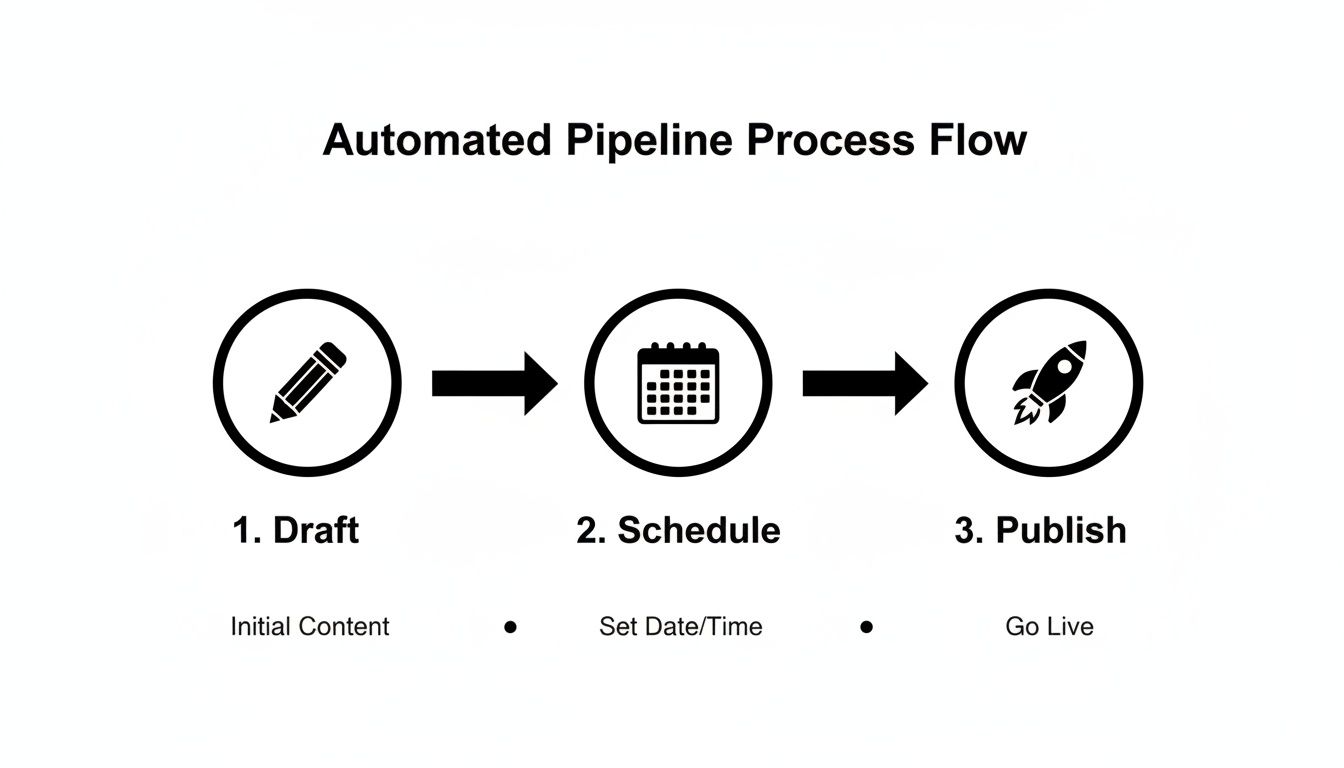
With everything in one flow, teams reclaim up to 8 hours per week.
Housing images, headlines and captions in a shared library slashes review cycles.
Tracking Metrics To Optimize
Choosing the right metrics tells you where to invest your energy. Focus on traffic, shares and lead captures for each format.
- Review performance weekly to spot trends early.
- Compare formats side by side in a simple grid.
- Reallocate resources toward the highest-ROI content.
Make it a habit to refine your calendar and repurposing plan every month. This drives continuous improvement throughout your pipeline.
Small teams have increased post frequency by 40% without extra hires—freeing time for strategy and creative testing.
Consistency in calendar design and repurposing can lengthen asset life by up to 70%.
Even small adjustments add up to big time savings over a quarter. Try mapping two articles into three new formats next month, then review results to fine-tune your next cycle.
Coordinating Assets Efficiently
A centralized project hub becomes your single source of truth. Labels, tags and clear folders help everyone find files in seconds.
Link calendar entries to file locations and set automated reminders for due dates.
| Asset Type | Location | Next Review |
|---|---|---|
| Blog Graphic | /assets/blog/images | Monthly |
| Social Video | /assets/social/videos | Biweekly |
| Infographic | /assets/infographics | Quarterly |
Standardizing file names and storage paths eliminates confusion. Your team spends less time searching and more time creating.
- Implement this today to boost your content output.
- Share your updated calendar and repurposing map with your colleagues.
Integrating AI Image Generation

AI-generated visuals remove one of the biggest hurdles in content production.
Design rarely has to wait for lengthy photo shoots. Instead, brands can spin up headshots or themed scenes in seconds.
When our team tried batch generation, graphic design time dropped by 70%—and that freed us to focus on storytelling.
Next up: refining your prompts for even smoother results.
Crafting Effective AI Prompts
A clear prompt sets the stage. I always start with mood, setting and style in one concise line.
Then I add details—lighting direction, color palette and subject posture. These elements cut down wasted attempts fast.
See our guide on crafting AI picture prompts for templates that work every time.
- Seed each prompt with brand keywords
- Reference past assets using file IDs or style tags
- Include density cues like “ultra high detail” or “soft light”
“Precise wording in prompts cuts wasted attempts by over half,” notes a photography freelancer.
Batch Generating Imagery
Batch output is a game-changer for efficiency. Queue up a batch early, then review results by afternoon.
- Assemble a CSV of prompt variations
- Launch generation via the YourAIPhotographer API
- Download and tag files in a shared folder
I saved roughly six hours each week with this process. Running quick A/B tests on two prompt sets showed Warm Tones drove 35% more engagement.
| Prompt Variation | Engagement Uplift |
|---|---|
| Warm Tones | 35% |
| High Contrast | 22% |
Up next: weaving these images into your design tools.
Integrating Assets In Workflows
Exported images slot straight into Figma, Canva or Adobe XD.
Automation scripts rename and organize files by campaign or date. This keeps your folders clean and cuts down on errors.
- Trigger an import when a new blog draft goes live in your CMS
- Auto-append relevant AI images via API
- Ping your team in Slack once assets are ready
Fast feedback loops let teams tweak visuals in minutes, not hours.
Maintaining Visual Consistency
AI models evolve, so you need version control on core style settings.
Lock in brand colors, aspect ratios and baseline images to your asset library.
Audits each month help spot any drift—like washed-out hues or funky framing—before you publish.
Balancing AI With Human Edits
AI gives you a strong starting point; your team adds the final polish.
Scan through batch results, pick the top three contenders and then:
- Adjust composition or crop in your design tool
- Tweak facial expressions or backgrounds to match tone
- Overlay text, icons or logos for context
Pairing AI output with manual touches ensures every visual feels ready for an audience.
Schedule a monthly alignment meeting with designers, writers and marketers to review AI results against your goals.
Capture insights in a shared log so your prompt templates keep improving.
This continuous feedback loop keeps your visuals on brand and high in impact as you ramp up output.
Start scaling today.
Measuring Performance And Scaling Further
Zeroing in on the right numbers turns guesswork into a clear path forward. When you track engagement, quality ratings, cost per lead and production speed, you see exactly where to push harder or pull back.
Without a unified view, teams often spend months spinning their wheels. Bringing data together on one dashboard solves that in an instant.
Essential Metrics For Scaling
- Engagement Rate: Clicks, likes and comments per audience member. Reveals what topics really land.
- Quality Score: Readability, SEO grade and user feedback combined. Keeps every asset sharp as you ramp up volume.
- Cost Per Lead: Total content spend divided by leads generated. Compares blog posts, videos or social ads fairly.
- Output Velocity: Number of assets completed each week. Flags production slowdowns so you can reassign resources.
“Data-driven metrics are the compass guiding rapid content growth.”
Regularly reviewing these figures helps you catch dips before they become full-blown problems.
Setting Up Content Dashboards
A single screen that pulls blog analytics, social metrics and email performance into one place is a game-changer. You can build this using tools like Google Data Studio or Tableau.
- Identify Data Sources: List every analytics platform, social channel and CRM export you need.
- Map Responsibilities: Assign each KPI a data location, refresh schedule and an owner.
- Design Visuals: Choose charts, tables or heatmaps that tell the story at a glance.
- Automate Refresh: Schedule data pulls, set fail alerts and notifications to keep everything current.
| Feature | Google Data Studio | Tableau |
|---|---|---|
| Setup Time | 15 min | 1–2 hours |
| Automation Flexibility | Built-in connectors | Advanced scripting |
| User Access | Free, unlimited viewers | License per user |
Benchmark Insights And Experiments
Some high-growth SaaS teams chase 30% month-over-month traffic lifts by running small tests every week. They tweak one variable at a time and watch what moves the needle.
- Experiment with morning, midday and evening post times to find peak engagement.
- Swap long-form pieces for quick reads to see which format drives more sign-ups.
- Test different AI-generated image styles, from color palettes to layouts, to learn what captures clicks.
Hiring And Outsourcing Framework
Choosing between in-house hires, freelancers or agencies often comes down to cost, skill set and speed. Here’s a quick comparison:
| Option | Monthly Cost | Skill Fit | Ramp Time |
|---|---|---|---|
| In-House | $5,000 | Full control | 3–6 months |
| Freelancer | $1,500 | Variable | 1–2 weeks |
| Agency | $4,000 | Broad services | 1 month |
Bring on full-time staff when your ROI justifies a salary. Call in freelancers or agencies for bursts of high demand.
Tips For Sustained Growth
Focusing on lead quality, time on page and repeat visits beats vanity stats every time. These tactics keep you on track:
- Review your dashboard weekly and archive metrics that no longer matter.
- Celebrate small victories with the team to keep morale high.
- Set alerts for sudden KPI drops so you can pivot immediately.
- Keep a growth log of experiments, outcomes and takeaways.
With consistent measurement and agile adjustments, you’ll maintain momentum and scale your visual content production effectively.
Frequently Asked Questions
Facing a sudden spike in visual content? Clustering similar tasks — like batch-generating images or drafting captions — makes a huge difference. Once you group them, you can set up automated pipelines that carry each job through editing, review, and publishing without constant back-and-forth.
Here are a few tools that help you lock in your batch workflow:
- Zapier (zapier.com) routes new AI images and copy snippets straight into your CMS in minutes
- Trello (trello.com) boards lay out tasks, due dates, and assignees at a glance
- Asana (asana.com) fires off reminders to reviewers, cutting approval cycles by days
Even the best AI drafts need a human touch to sound like your brand. Feeding the model 20+ samples of your own headlines, captions, and tone guidelines early on will save hours of edits later.
“Feeding the AI with real samples cuts draft revisions by over 50%,” says a freelance designer.
Competing With Larger Agencies
A lean team can punch above its weight by digging deep into a niche. When everyone knows exactly what they own — from image selection to final tweaks — you match the big players’ output without ballooning headcount.
| Team Type | Output Speed | Cost Efficiency |
|---|---|---|
| Small Team | High | Low Overhead |
| Large Agency | Medium | Higher Budgets |
Measuring Content Performance
You can’t improve what you don’t measure. Focus on a handful of clear KPIs to see what’s working and where you need a tweak:
- Engagement Rate: how users react to each asset
- Cost Per Lead: efficiency of your spend across channels
- Output Velocity: how many pieces you ship per week
- Quality Score: a composite of readability, SEO grade, and audience feedback
Each metric shines a light on your next move—whether it’s refreshing your hooks or tightening targeting.
Figuring out promotion spend can feel like guesswork. A good benchmark is to earmark 5%–10% of your total content budget for paid distribution:
- 5% on social ads to amplify top performers
- 3% on influencer partnerships per quarter
- 2% on retargeting campaigns to warm up leads
Keep an eye on ROI for each slice and you’ll dial in next month’s spend without second-guessing.
Ready to scale your visual content creation with speed and quality? Check out YourAIPhotographer for AI-driven image pipelines that fit into any workflow. Start generating polished assets in seconds today at YourAIPhotographer.